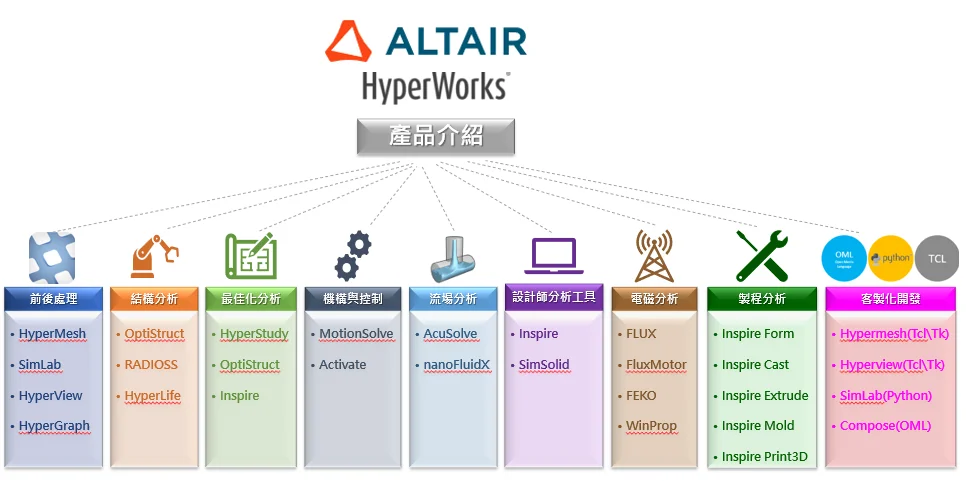
Mesh Modeling and Pre/Post-processing
|
|
HyperMesh
|
◆ Description: General-purpose professional pre-processing tool.
◆ Suitable for: Mesh modeling of all kinds of complex structures.
◆ Case study: Server fully automated one-stop CAE modeling – HyperMesh customization
|
|
SimLab
|
◆ Description: High-efficiency solid element meshing tool.
◆ Suitable for: Complex geometric features, such as laptop keyboards, air mesh boundary layers, etc.
◆ Case study: SimLab PCB modeling and thermo-fluid coupling analysis
|
|
HyperView
|
◆ Description: Professional post-processing tool.
◆ Suitable for: Supporting a wide range of mainstream CAE solvers, including Abaqus, Adams, ANSYS, DYNA, MARC, etc.
◆ Case study: HyperView lazy workflow – finish reports while you enjoy a cup of coffee
|
|
HyperGraph
|
◆ Description: Powerful data plotting and analysis tool that converts CAE results into charts and automatically generates reports.
◆ Suitable for: Projects that require quick generation of standard reports and efficient comparison of simulation and test results.
|
Structural Analysis
|
| Optistruct |
◆ Description: Powerful nonlinear implicit solver.
◆ Suitable for: Static analysis, modal frequency response analysis, random vibration.
◆ Case study: Highly accurate correlation between OptiStruct and Radioss analyses
|
| Radioss |
◆ Description: Powerful nonlinear explicit solver.
◆ Suitable for: Drop, impact and other dynamic analyses, as well as quasi-static analysis of multi-component electronic products.
◆ Case study: Drop test analysis for consumer electronics
|
| HyperLife |
◆ Description: Widely used fatigue analysis software.
◆ Suitable for: Fatigue issues such as welds, spot welds, seam welds, random vibration, swept-sine, and modal-based transient.
◆ Case study: Integrated analysis of random vibration and fatigue for electronic products
|
Optimization and Fast CAE Platform
|
|
Optistruct
|
◆ Description: Topology and composite laminate optimization analysis tool.
◆ Suitable for: Structural lightweighting, sheet metal stiffness optimization, and composite topology optimization.
◆ Case study: One-shot packaging drop test topology optimization
|
|
HyperStudy
|
◆ Description: Multi-disciplinary parameter optimization analysis tool.
◆ Suitable for: Multi-objective and reliability/robustness-based design optimization.
◆ Case study: Feko + HyperStudy electromagnetic design optimization
|
Computational Fluid Dynamics (CFD)
|
|
AcuSolve
|
◆ Description: General-purpose CFD tool.
◆ Suitable for: Thermal management such as air cooling, liquid cooling, radiation; virtual wind tunnel (aerodynamic drag calculation).
◆ Case study: Fluid–structure–acoustic coupling analysis of an automotive panel
|
|
ElectroFlo
|
◆ Description: Fast thermal fluid analysis software dedicated to electronic packaging.
◆ Suitable for: Thermal analysis of enclosures, cabinets, PCBs, and consumer electronic products.
◆ Case study: Using ElectroFlo for automotive electronic equipment thermal analysis
|
|
nanoFluid
|
◆ Description: CFD tool based on Smoothed Particle Hydrodynamics (SPH).
◆ Suitable for: Lubrication oil spray and heat transfer analysis of gears and gearboxes.
◆ Case study: Altair nanoFluidX CFD feature overview
|
|
ultraFluidX
|
◆ Description: CFD tool based on the Lattice Boltzmann Method (LBM).
◆ Suitable for: Aeroacoustics, fan noise, and vehicle external flow wind noise.
◆ Case study: New CFD pre-processing and AcuSolve feature highlights
|
High- and Low-frequency Electromagnetics & Power Electronics Simulation
|
|
Flux
|
◆ Description: Low-frequency electromagnetic field analysis tool.
◆ Suitable for: Motors, transformers, magnetic components, magnetic force calculations, etc.
◆ Case study: Flux and multi-disciplinary motor optimization
|
|
FluxMotor
|
◆ Description: Modular topology design tool dedicated to rotating machines (motors).
◆ Suitable for: Design of inner/outer rotor permanent magnet, induction, and synchronous reluctance machines.
◆ Case study: Exploring FluxMotor – motor topology design tool
|
|
FEKO
|
◆ Description: High-frequency electromagnetic and antenna design analysis tool.
◆ Suitable for: Antenna design, antenna placement, electromagnetic scattering, radar cross-section (RCS), and electromagnetic compatibility (EMC) analysis.
◆ Highlight: Three major industrial applications of Feko high-frequency electromagnetics
|
|
WinProp
|
◆ Description: Radio wave propagation and wireless network planning tool.
◆ Suitable for: Applications in wireless communication, satellite communication, indoor/outdoor environments, and transportation systems. |
|
PSIM
|
◆ Description: Power electronics and motor control simulation software.
◆ Suitable for: Power electronic circuits of various power levels, motor drive control, etc.
◆ Case study: Understanding the two major applications of PSIM: power electronics and motor drive control
|
Mechanism and Control Analysis
|
|
MotionSolve
|
◆ Description: Professional tool for multi-body dynamics analysis and optimization.
◆ Suitable for: Automotive, aerospace, general machinery and other industries.
|
|
Activate
|
◆ Description: Multi-disciplinary system modeling, simulation and optimization software that boosts design efficiency and performance through 1D block diagram modeling.
◆ Suitable for: Analyzing dynamic behavior of complex systems and projects involving multi-disciplinary system integration and optimization.
◆ Case study: How to use software to keep a mechanical bird flying stably
|
|
EDEM
|
◆ Description: High-performance simulation software for bulk and granular materials.
◆ Suitable for: Projects in heavy machinery, off-road vehicles, mining equipment and process manufacturing to optimize equipment performance and processes.
|
Meshless Analysis
|
|
SimSolid
|
◆ Description: Meshless fast structural analysis software.
◆ Suitable for: Large assemblies with complex geometries, enabling fast analysis without meshing or geometry simplification.
◆ Case study: Meshless analysis application in servers (SimSolid)
|
Manufacturing Process Simulation
|
|
Inspire Print3D
|
◆ Description: Software for designing and simulating additive manufacturing (3D printing).
◆ Suitable for: Projects involving design, simulation, and optimization of selective laser melting (SLM) parts.
|
|
Inspire Extrude
|
◆ Description: Simulation software specifically designed for extrusion processes.
◆ Suitable for: Co-extrusion, spiral dies, metal insert co-extrusion, and film/sheet die heads, simulating metal and polymer extrusion manufacturing projects.
|
|
Inspire Form
|
◆ Description: Sheet metal forming and stamping simulation software.
◆ Suitable for: Simulating sheet metal stamping processes to improve design and increase material utilization.
|
|
Inspire_Cast
|
◆ Description: Casting simulation tool that effectively simulates casting processes and predicts potential defects.
◆ Suitable for: Projects needing quick assessment of castability and gating system optimization.
|
|
Inspire_Mold
|
◆ Description: Injection molding simulation software.
◆ Suitable for: Projects requiring simulation of plastic injection molding processes.
|
|
Inspire_PolyFoam
|
◆ Description: Polyurethane foaming simulation software.
◆ Suitable for: Simulating soft foam, semi-rigid foam and rigid foam products, improving the foaming process and enhancing product quality.
|
|
Inspire_Studio
|
◆ Description: Industrial design software.
|