.......Altair HyperView is a complete post-processing and visualization software for finite element analysis, multi-body system simulation, digital video, and engineering data. Its amazingly fast 3D graphics, open architecture, and unparalleled capabilities set a new standard for the speed and integration of CAE result post-processing. Combined with HyperView’s advanced process automation tools, these features greatly enhance result visualization, correlation, and report generation.
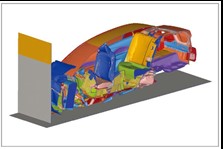
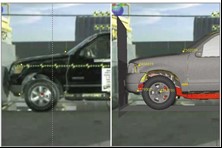
Momentum result section display
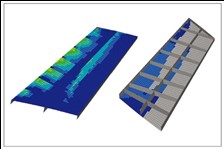
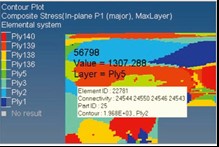
Synchronized contour plots
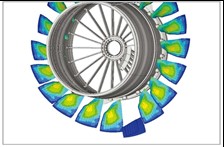
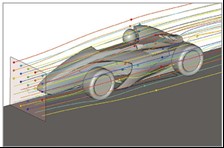
Exploded view
Further reading: HyperView lazy workflow – easily create reports in the time it takes to drink a cup of coffee
【 Product Highlights 】
A complete visualization environment for FEA, CFD, and MBD simulation data
Multi-page, multi-window post-processing
Report templates that efficiently evaluate various simulation results
Comprehensive post-processing capabilities for composite material results
Supports most CAE solver result formats
Dedicated toolboxes for NVH, aerospace, safety, CFD, and manufacturing processes
Result comparison and correlation with test data
【 Advantages 】
Increase Productivity
Industry-leading 3D graphics processing and animation speed.
Directly reads results from mainstream CAE solvers and allows creation of user-defined result converters.
Powerful XY plotting and 3D plotting capabilities.
Customizable interface for building dedicated tools tailored to unique engineering environments and requirements.
Direct connection to Altair HyperView Player for web-based communication and collaboration.
Gain More Insightful Visualization Results
Synchronize and visualize finite element analysis results, multi-body system results, XY plots, and video data.
Overlay multiple CAE models within a single window.
Perform mathematical operations on results to create user-defined result types, such as failure indices.
Query models based on user-defined criteria.
Automatic Report Generation
Automatic session creation: automatically generates and executes standard plots and tables, and uses the “Report: Overlay” option to quickly compare results and perform correlation studies.
One-step report generation: exports HyperView session reports to HTML or PowerPoint, including text, images, AVI, and H3D files.
Extensible User Interface
Templex scripting: create user-defined curve math functions, and use annotations, labels, and parameterized text files for data analysis and curve statistics.
Custom drop-down menus: develop user-defined menus to provide convenient access to reports, plotting macro commands, and custom wizards.
Tcl programming layer: automate workflows through a programmable Tcl/Tk command layer.
Custom import/export templates: define templates for reading and writing XY plot data.
【 CAE Animation & Data Plotting 】
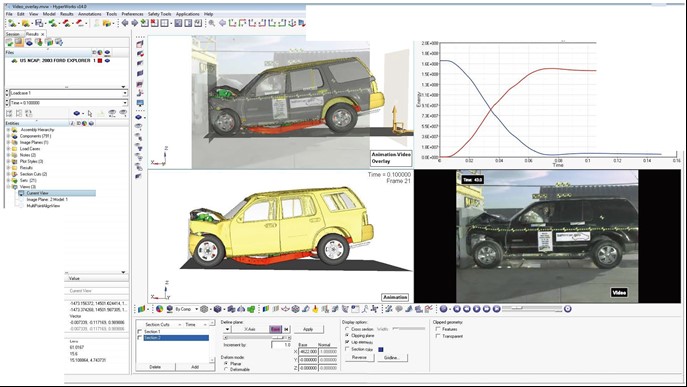
HyperView provides a complete set of animation, data plotting, and digital video capabilities. In a single environment, users can easily synchronize, compare, and review finite element analysis results, multi-body system results, XY plots (simulation and experimental data), and digital video data.
Animation
Contour plots (scalar & tensor)
Vector plots
Tensor plots
Deformed shape plots
CFD streamline plots
Deformation animations
Linear animations
Modal animations
Transient animations
Multi-body dynamics animations including flexible bodies
To facilitate result comparison and correlation analysis, HyperView provides image and video planes for combining experimental and simulation results.
【 HyperView Also Supports 】
Exploded views
Isosurfaces
Part and component tracking
Interactive cutting planes
Graphical annotations
User-oriented image and video support
3D stereo view
Free-body diagrams and result plotting
Symmetry
【 Report Generation 】
.......By using Altair HyperGraph™ PPT “Publish” together with report templates, it is easy to generate standard reports and keep the content synchronized. Any change made in HyperView is automatically updated in PPT. Users have detailed control over the output content and formatting, and all common animation and graphic formats are supported.
【 HyperView Player 】
.......HyperView Player is a standalone 3D viewer that provides an enterprise-level collaborative solution for result data visualization. Users can export 3D animation results in Altair H3D file format and then review and interact with them using HyperView Player. The player can also be embedded as a plug-in into PPT or web pages, making it convenient to present analysis results to analysis engineers, test engineers, mold designers, and product design engineers.
【 Solver Interfaces 】
HyperView can directly read result files from many mainstream CAE solver formats, providing a flexible, consistent, and high-performance environment for animating and plotting CAE simulation results. Through user-defined result converters, additional solver formats can be supported. These converters transform results into Altair H3D compressed binary format.
Altair HyperWorks™ also provides two converters, HvTrans and HgTrans, which can handle various types of engineering data. HvTrans allows you to extract, convert, and compress CAE results, while HgTrans lets you use built-in mathematical function libraries to create custom mathematical expressions to convert, compress, and process data files.
We use cookies to collect and analyze information on site performance and usage. By Clicking "Continue" or by clicking into any content on this site, you agree to allow cookies to be placed. To find out more, please visit our privacy policy。