A Multi-Physics Simulation Platform that Can Connect to CAD
.......SimLab is a process-oriented 【multi-disciplinary simulation platform】 that can accurately analyze complex assembled products. Through highly automated modeling and an easy-to-use interface, it can perform multi-physics simulations including structural, thermal, fluid dynamics, electromagnetic, and manufacturing processes, significantly reducing the time required for CAE modeling and result interpretation.
.......Altair’s robust, accurate, and scalable solvers can run locally, on remote servers, or in the cloud. Its intuitive and straightforward GUI covers all aspects of the modeling process. Without tedious geometry cleanup, users can directly perform advanced operations on the geometry. After defining mesh parameters for each region, models can be imported and updated through bi-directional CAD coupling.
Further Reading:PCB Modeling and Thermal–Structural Coupled Analysis Case|SimLab x OptiStruct
|

Meshing of complex components
|
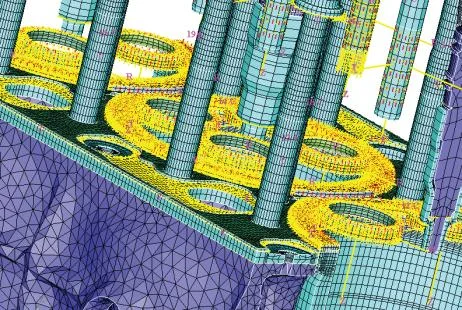
Automatic contact creation based on templates
|

Gearbox meshing
|
【 Product Highlights 】
- Process-oriented, feature-based finite element modeling software
- Automatic mesh generation without CAD geometry cleanup
- Feature-based reusable mesh control files such as chamfers, cylindrical surfaces, and holes
- Contact, bolt, and crankshaft models created using templates
- Supported solver interfaces include OptiStruct, Abaqus, Nastran, and PERMAS
【 Advantages – Efficient Feature-Based Modeling 】
- Improved modeling repeatability and quality
- Directly identifies geometric features in CAD such as fillets, cylindrical surfaces, and grooves
Automatic Modeling for Complex Assemblies
- Meshing
- Assembly of components
- Mesh generation on matching faces of a component
- Component connection
Accelerated CAE Modeling of Complex Components
- Advanced template-based mesh generation process
- No manual mesh cleanup required
Simplified Definition and Creation of Loads and Boundary Conditions
- Simplified model and assembly relationship modification
- Component replacement
- Add or modify stiffeners in solid models
- Modify fillet/cylindrical hole attributes
- Quickly link model parameters for DOE analysis
- SimLab’s modeling environment is CAD and solver neutral
【 Functions 】
Meshing
.......SimLab adopts a different approach to generating high-quality meshes. It maps CAD features such as fillets and cylindrical surfaces into the finite element model. These features can be used later in the process without needing to return to the CAD geometry. SimLab offers many unique and efficient tools for generating various types of meshes. Through a template system, all these tools can be integrated and simplified into automated processes to generate high-quality meshes suitable for various analysis types including NVH, durability, fatigue, CFD, and others.
Automatic Meshing
- Solid tetra and hexa meshing
- Surface quad and triangle meshing
- 1D mesh generation for connecting parts and contact surfaces
Feature-Based Meshing
- Automatic identification of CAD features
- Apply corresponding templates to generate meshes for features such as cylindrical surfaces, chamfers, and holes
- Automatic identification of contact surfaces
- Template-based meshing for different analysis types such as stress analysis, NVH, acoustic cavity analysis, fatigue, etc.
Geometry
.......SimLab adopts a unique method of handling geometry models to accurately and efficiently generate meshes. Its meshing workflow enables users to avoid any geometry cleanup, allowing focus on mesh generation instead of repairing poor geometry.
SimLab can directly read native geometry from the following CAD tools:
- CATIA V5
- Pro/Engineer
- UG
- Any CAD tool based on Parasolid, such as SolidWorks, SolidEdge, etc.
Assembly Management
- A comprehensive toolkit for full-system component processing
- Component matching and contact surface identification
- Quickly apply boundary conditions to multiple groups in a component
- Common connection element libraries
Loads and Boundary Conditions
When handling complex models and components, the average mesh size can quickly produce millions of elements and nodes.
In this sense, applying boundary conditions to a single element or node is no longer feasible.
SimLab provides a series of advanced menu-driven tools to guide users through the automation process easily.
Process-Oriented Features
- Map results from fine meshes to coarse meshes or vice versa
- Menu-driven bearing modeling and bearing pressure application
- Spatially distributed result mapping into the model (e.g., mapping thermal analysis results into structural models)
- Automated templates include:
‐ Bolt creation ‐ Washer, bearing, and joint modeling
‐ Mass element simplification ‐ Connection based on external materials and properties
‐ Contact detection and creation ‐ Condensed model creation for AVl Excite
Post-Processing
.......SimLab includes a complete post-processor. In addition, customized user tools such as cylinder bore deformation and frequency response are also available.
|

Bearing pressure contour
|

Elliptical mesh in acoustic cavity analysis
|
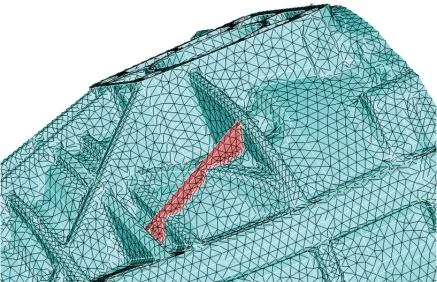
Editing existing meshes
|
SimLab Free Learning Resources
SimLab, with its efficient simulation and analysis capabilities, is widely loved by engineers. We now provide “SimLab Free Learning Resources,” designed especially for professionals who cannot attend physical courses. These courses offer flexible learning schedules so you can master the powerful features of Altair SimLab anytime, anywhere.
Click now to begin your learning journey.
Start Learning◆
If you would like to take our in-person course, you are also welcome to register!→ Click to Register
Richin Technology is the “Expert in CAE and AI Data Analysis,” and we have completed many successful case studies.
▶ Contact us now here to get more information.
▶ Subscribe to our Richin YouTube Channel to explore more CAE and data analytics content.