Pre-processing / Solvers / AI / Custom Development
Key 2024 Highlights at a Glance
Introduction
Author: Richin Technology Chris
HyperWorks in the 2024 release adds many practical features. The biggest highlights are major technical breakthroughs in the structural analysis solver OptiStruct and Physics AI.
OptiStruct solver supports implicit-to-explicit continuation analysis, enabling explicit/implicit switching and making it easy to complete an end-to-end explicit/implicit workflow.
PhysicsAI significantly enhances model parameter input capabilities. In addition to the original support for using shape as training data, it can now also handle different thicknesses, materials, and boundary conditions—helping customers solve more real-world engineering problems. Next, let’s walk through the technical highlights of HyperWorks 2024.
【 HyperMesh 2024 】
- Performance improvement: no longer runs two separate backend programs—integrated into a single hw.exe.
- Custom hotkeys: lets users freely define their own keyboard shortcuts.
- Simplified Topology menu workflow: streamlines button hierarchy for more straightforward logic.
- Entity Editor: a unified editor for model editing; can be moved freely or used as a pop-up window.
- Expanded FE Geometry support: Cross Extend & Stitch geometry editing now extends to FE Geometry.
- Connector updates: updated property menus so users can more intuitively choose connector types and functions based on engineering needs.
- ShapeAI: provides two key functions—automatic matching and identification of component types/classifications.
- Altair Copilot (AI assistant): a brand-new AI support assistant that understands multiple natural languages and answers questions entirely based on Altair online help and other Altair knowledge resources.
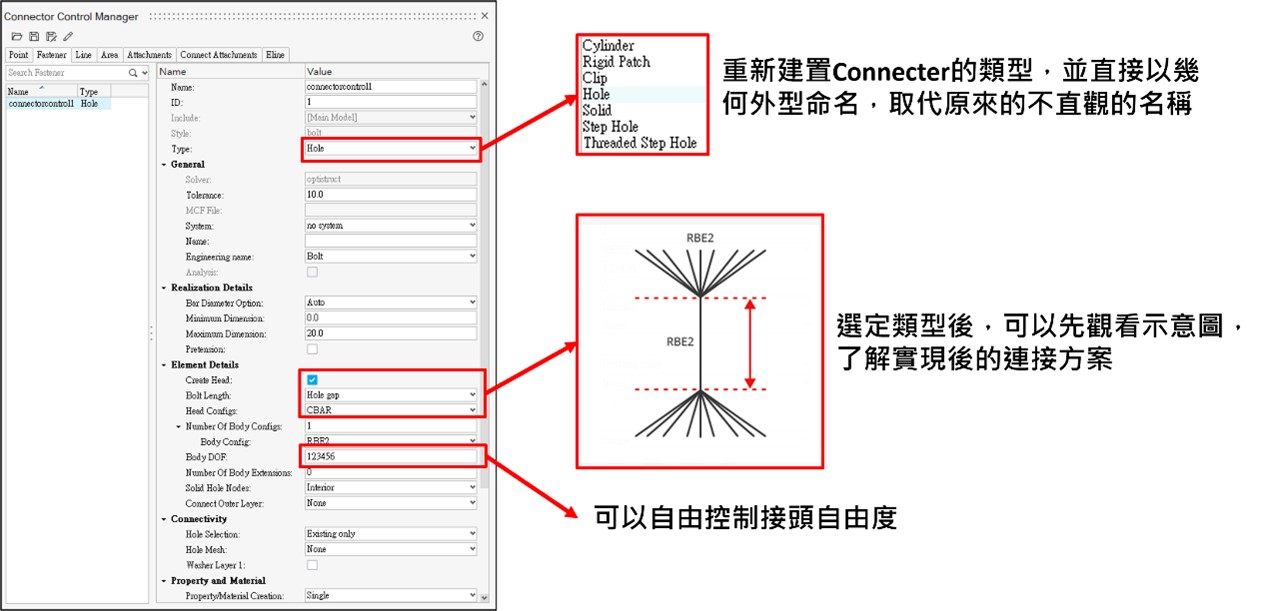
Figure 1. HyperMesh Connector feature updates
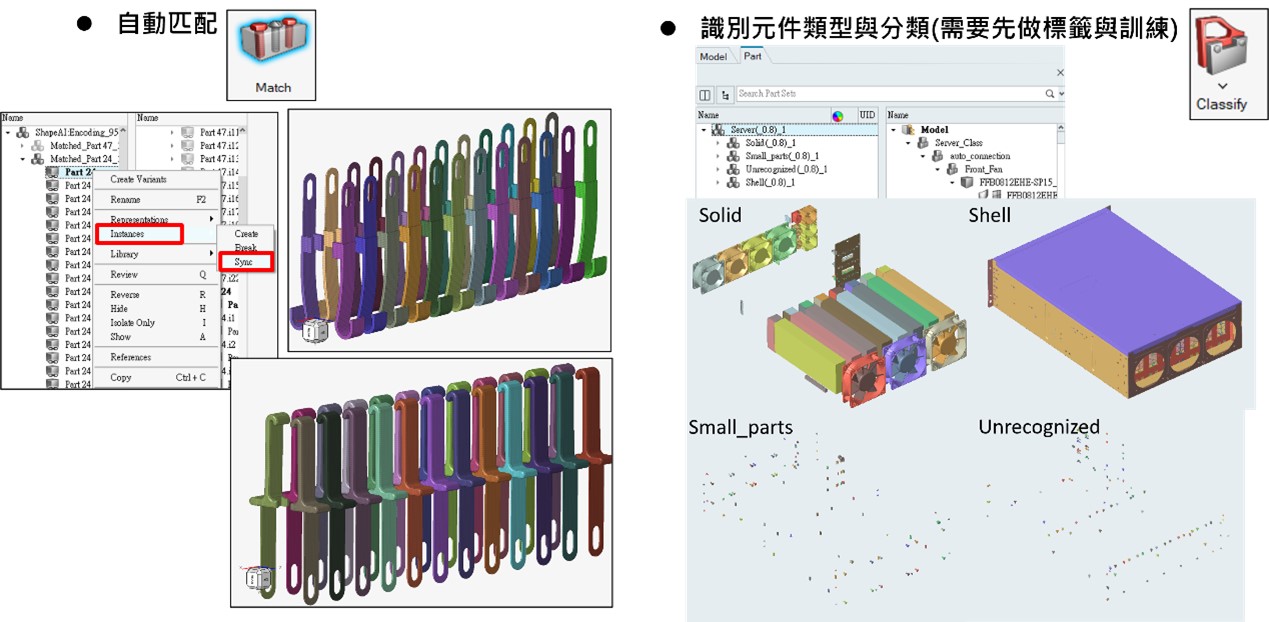
Figure 2. HyperMesh highlight feature: Shape AI
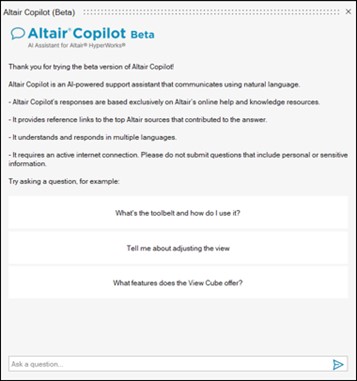
Figure 3. HyperMesh adds Altair Copilot (AI assistant)
【 SimLab 2024 】
- Custom hotkeys: allows users to customize shortcuts to a limited extent.
- Enhanced geometry cleanup: feature cleanup, previously limited to meshed models, can now also be used on CAD models.
- Enhanced low-frequency EM support: provides more complete parameter and boundary-condition setup for low-frequency electromagnetic analyses.
- Create SMPM: automatically generates sketches from permanent magnet synchronous motor parameters, improving modeling efficiency.
- Flux mesh quality checks: supports mesh quality checking specifically for the Flux solver.
- Create Stator and Rotor Air: supports creating air-gap mesh between stator and rotor and automatically separates the stationary and rotating domains.
- Reflective Surface: supports defining reflective surfaces outside the fluid domain for external acoustics.
- Sound Receiver: receivers can be created according to ISO 3744 and ISO 3745 standards.
- Battery pack auto-modeling: supports parametric automatic modeling of battery pack modules.
- Electro-thermal coupled analysis for battery packs: performs thermal analysis using Joule heat generated from circuit models as the heat source.
- Expanded ECAD import and modeling: supports more ECAD formats including GDS, and adds material property mapping that supports coarse/fine meshes.
- Expanded solder fatigue algorithms: adds a new solder ball fatigue solution, currently supporting three fatigue algorithms.
- BGA mesh refinement: adds a tool to refine solder ball meshes.
- 3D IC parametric modeling: supports creating meshed models from given parameters for subsequent layout analyses.
- Submodel setup: supports building submodels in the SimLab GUI environment.
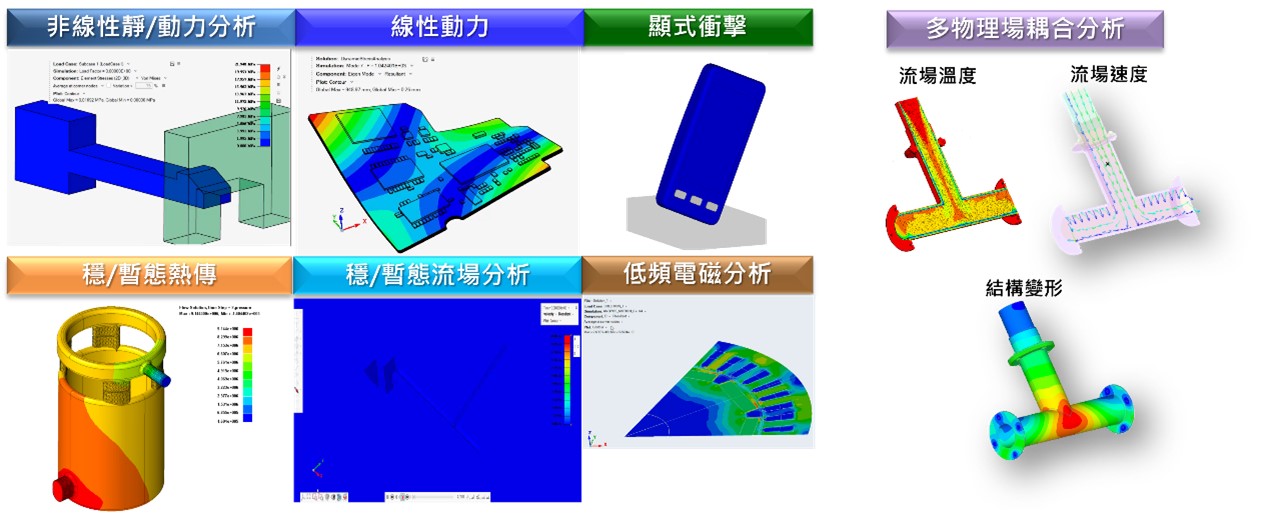
Figure 4. SimLab multiphysics platform analysis support
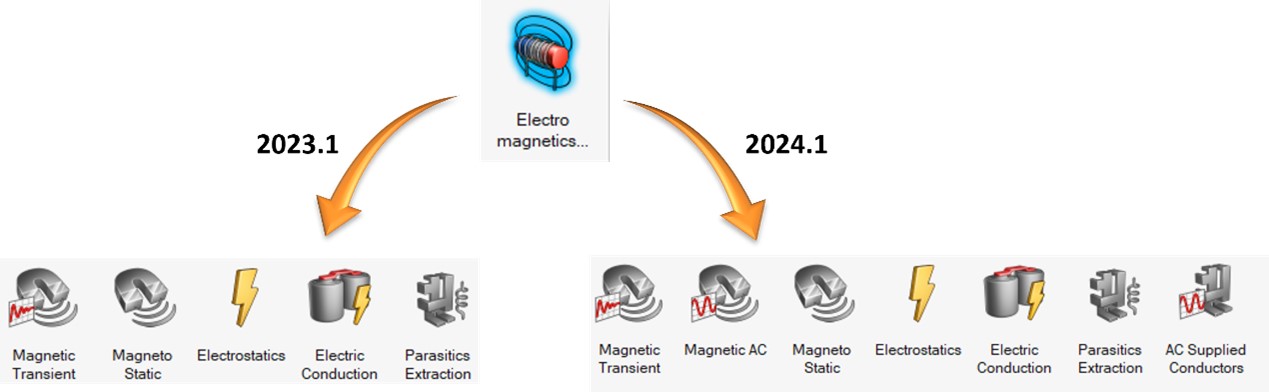
Figure 5. Enhanced low-frequency electromagnetic analysis support in SimLab
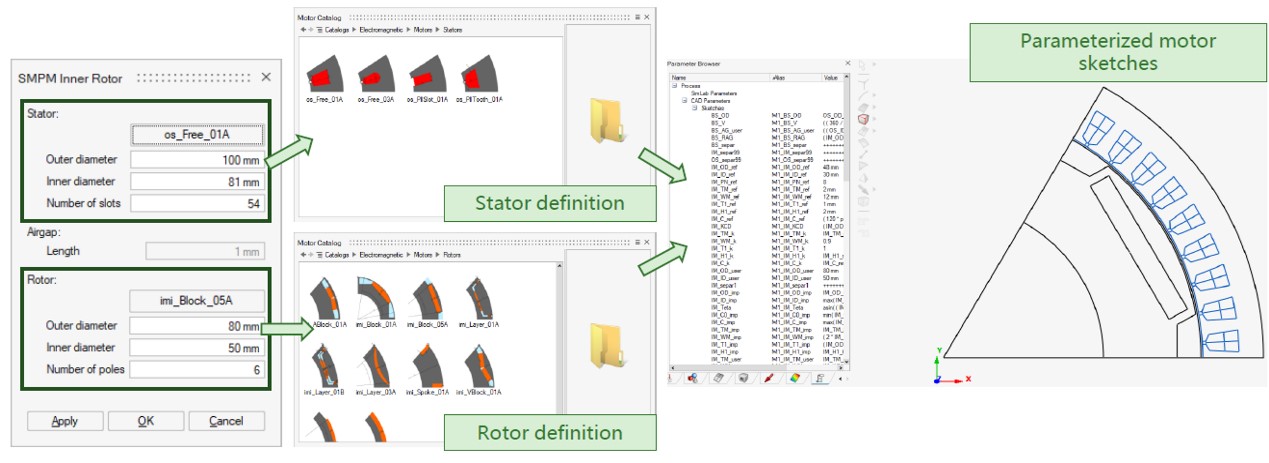
Figure 6. SimLab Auto Create SMPM
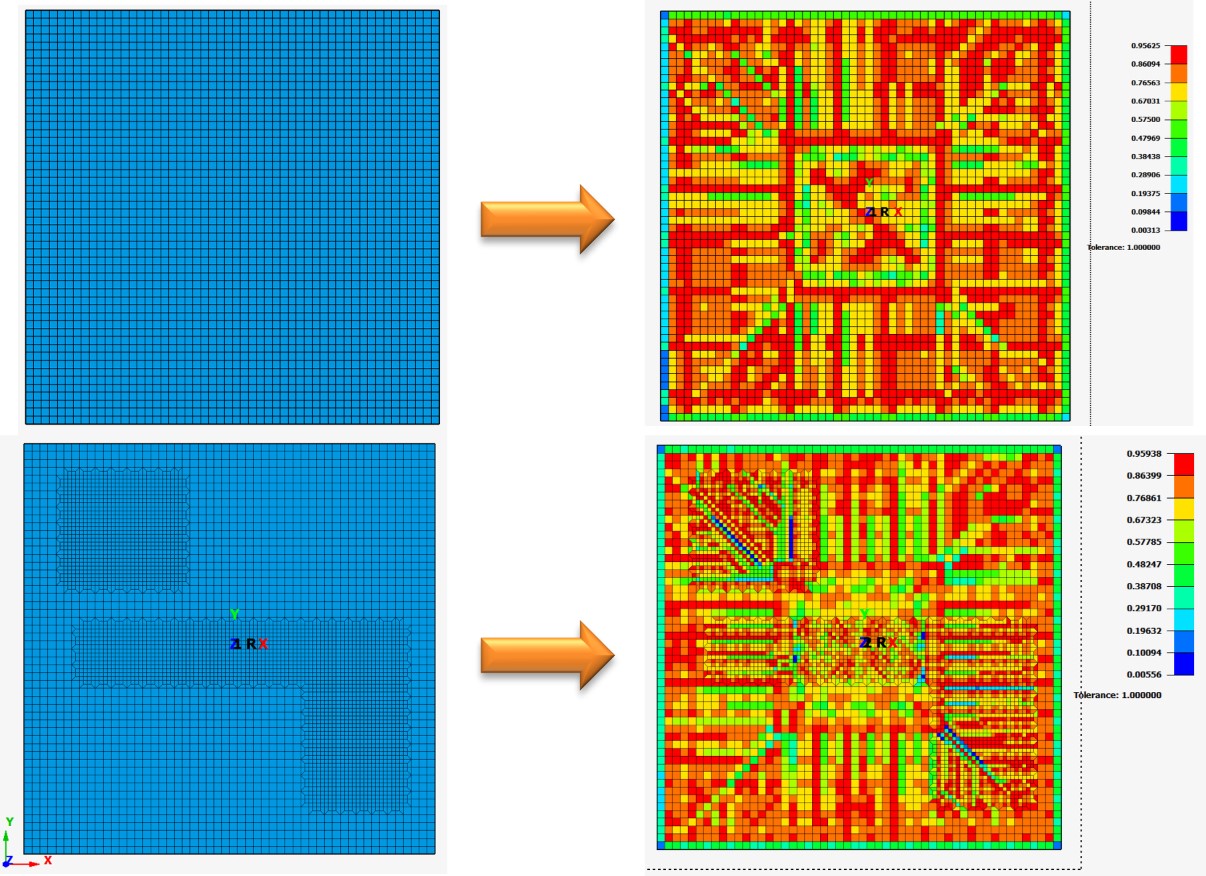
Figure 7. SimLab adds material property mapping supporting coarse/fine meshes
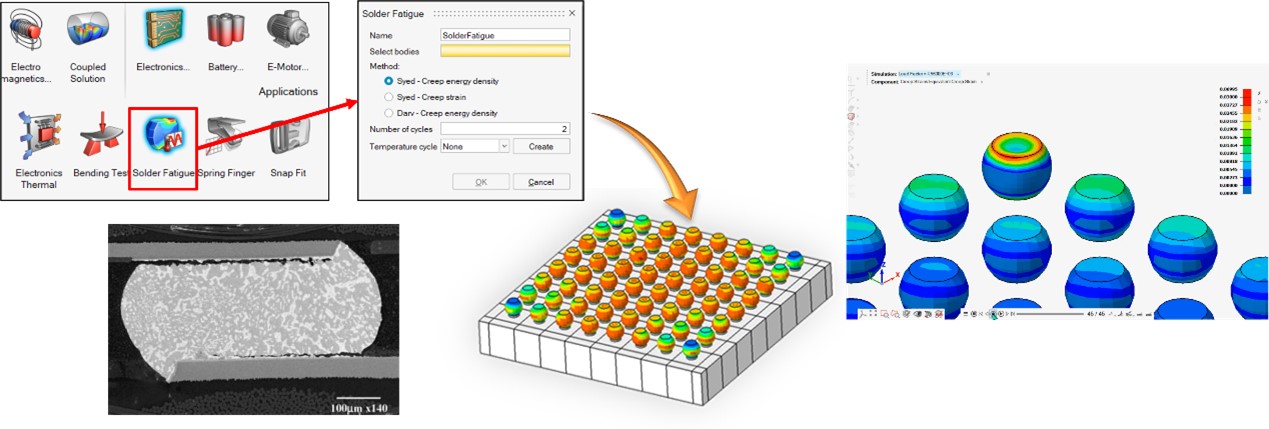
Figure 8. SimLab adds a new solder ball fatigue solution
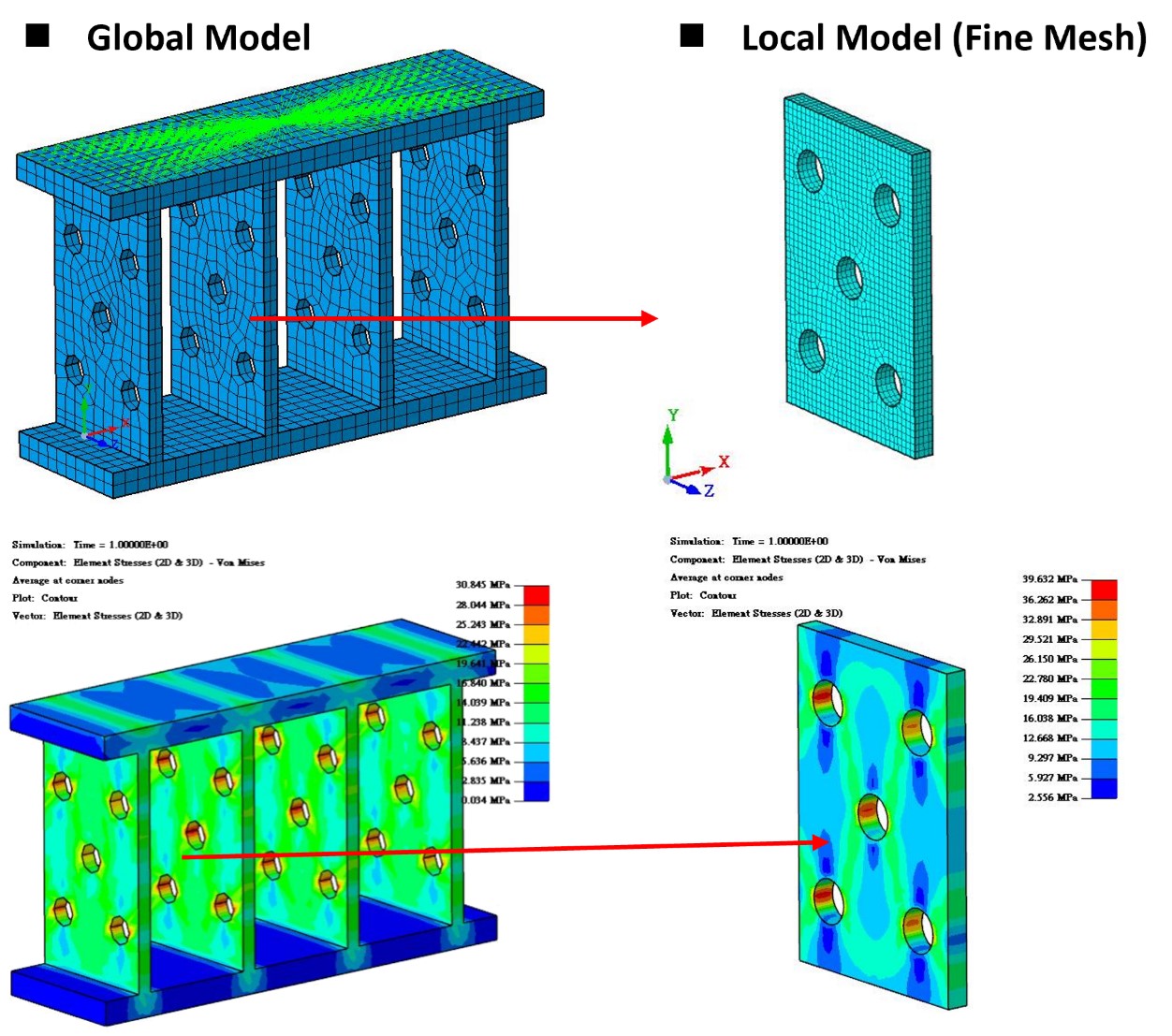
Figure 9. SimLab supports submodel setup
【 OptiStruct 2024 】
- Electro-thermal coupled analysis support: supports one-way or two-way coupling between these two physics.
- Fully coupled electro-thermo-structural nonlinear analysis: provides a brand-new fully coupled solution mainly to support nonlinear analysis across these three physics.
- Temperature-dependent adhesive analysis support: adds adhesive analysis capabilities that account for temperature effects.
- Axisymmetric elements support heat transfer analysis: enables heat transfer analysis even under axisymmetric simplified models.
- Cyclic symmetry support for nonlinear analysis: cyclic symmetry now extends to nonlinear models and supports the three main nonlinearities.
- MATS1 temperature-dependent parameters: accounts for temperature effects on the post-yield nonlinear region of materials.
- Apply through-thickness temperature gradients on shell elements: adds the ability to compute different temperatures through thickness, enabling more applications for thermal stress analysis on shells.
- OptiStruct-EDEM Coupling: provides real-time coupling between the two modules.
- Adaptive matched layer mesh for acoustics (APML): divides the analysis frequency range into smaller bands and automatically meshes the matched layer for each band based on user-defined meshing rules (matched layer thickness, elements per wavelength, etc.).
- Acoustic analysis supports external reflective surfaces: supports defining reflective surfaces outside the fluid domain for external acoustics.
- Material damage and failure in Explicit: like Radioss, Explicit analysis supports multiple material failure models and element deletion after failure.
- Implicit-to-explicit continuation analysis: implicit results can be used as the initial state for explicit continuation analysis by enabling the continuation option in the Loadstep.
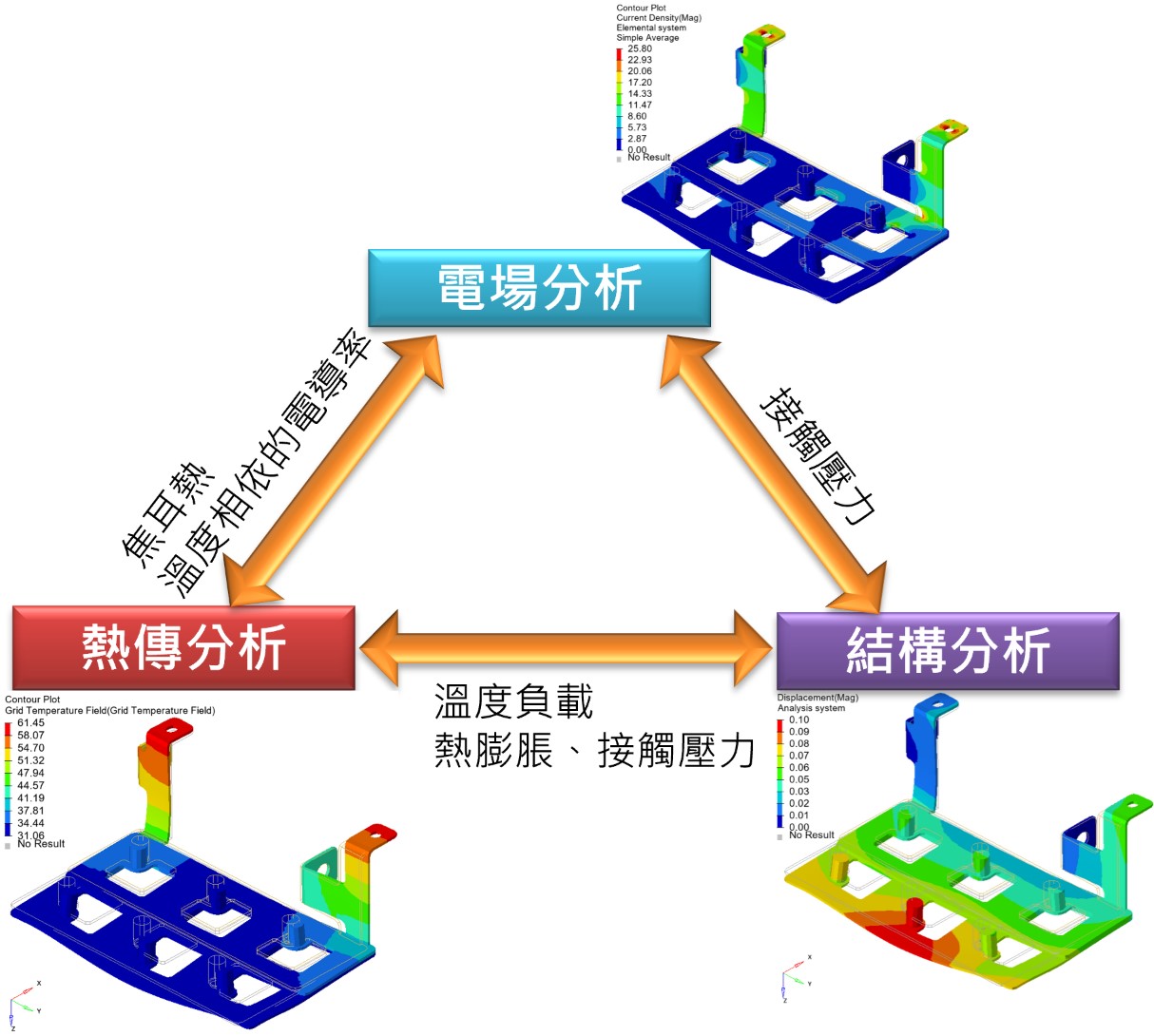
Figure 10. OptiStruct supports fully coupled electro-thermo-structural nonlinear analysis
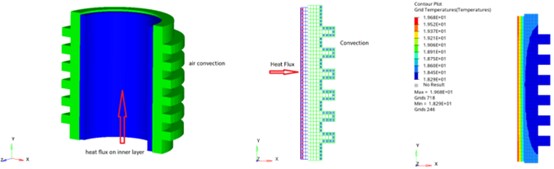
Figure 11. OptiStruct supports heat transfer analysis for axisymmetric models
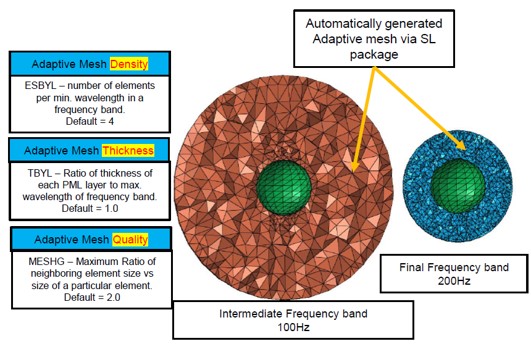
Figure 12. OptiStruct adds the Adaptive Matched Layer Mesh (APML) algorithm
【 Radioss 2024】
- DynaReader enhancements: complete vehicle Dyna models can be read directly for solving (excluding barriers, airbags, and dummies). DynaReader continues to be updated and can insert Radioss cards into Dyna models.
- Added LS-DYNA keyword support: supports converting more advanced LS-DYNA cards to their corresponding Radioss equivalents.
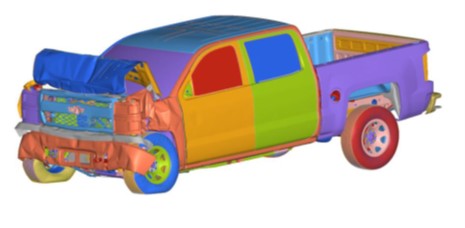
Figure 13. Radioss adds LS-DYNA keyword support
【 HyperWorks AI 2024 】
PhysicsAI: discipline-neutral + no manual geometric parameter setup required
- Can include different materials and thicknesses as training parameters
- Can include different boundary conditions as training parameters
- Integrated with SimLab so it can be used within the SimLab environment
- New application scenarios: result prediction for manufacturing processes (injection molding, casting, and sheet metal forming)
ExpertAI: machine-learning-based clustering and optimization analysis
- New application scenarios: assisting process parameter optimization for manufacturing processes
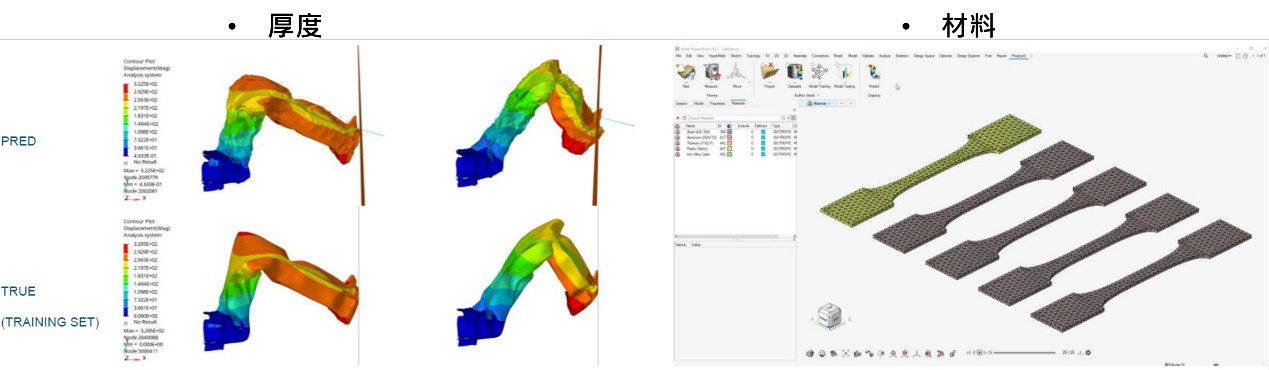
Figure 14. PhysicsAI can include different materials and thicknesses as training parameters
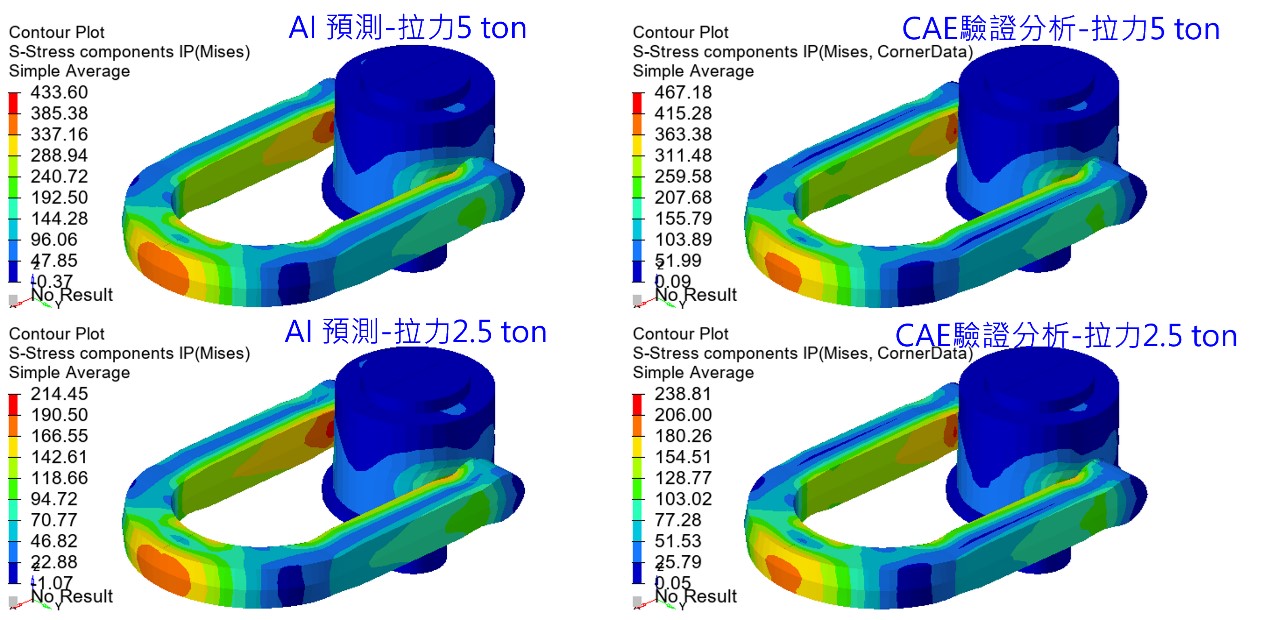
Figure 15. PhysicsAI can include different boundary conditions as training parameters
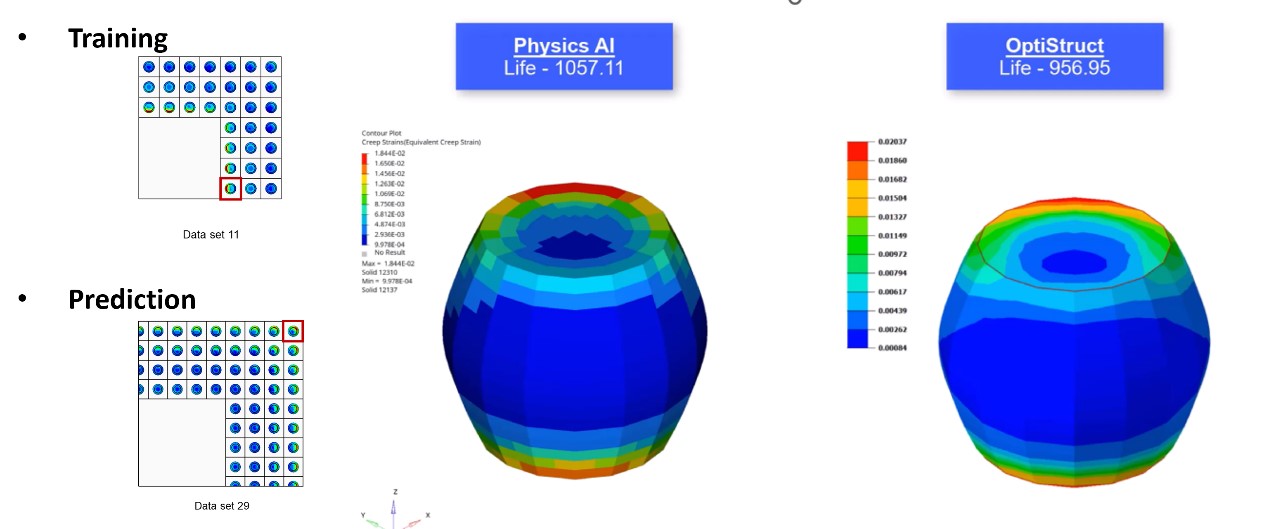
Figure 16. PhysicsAI for solder ball fatigue life prediction
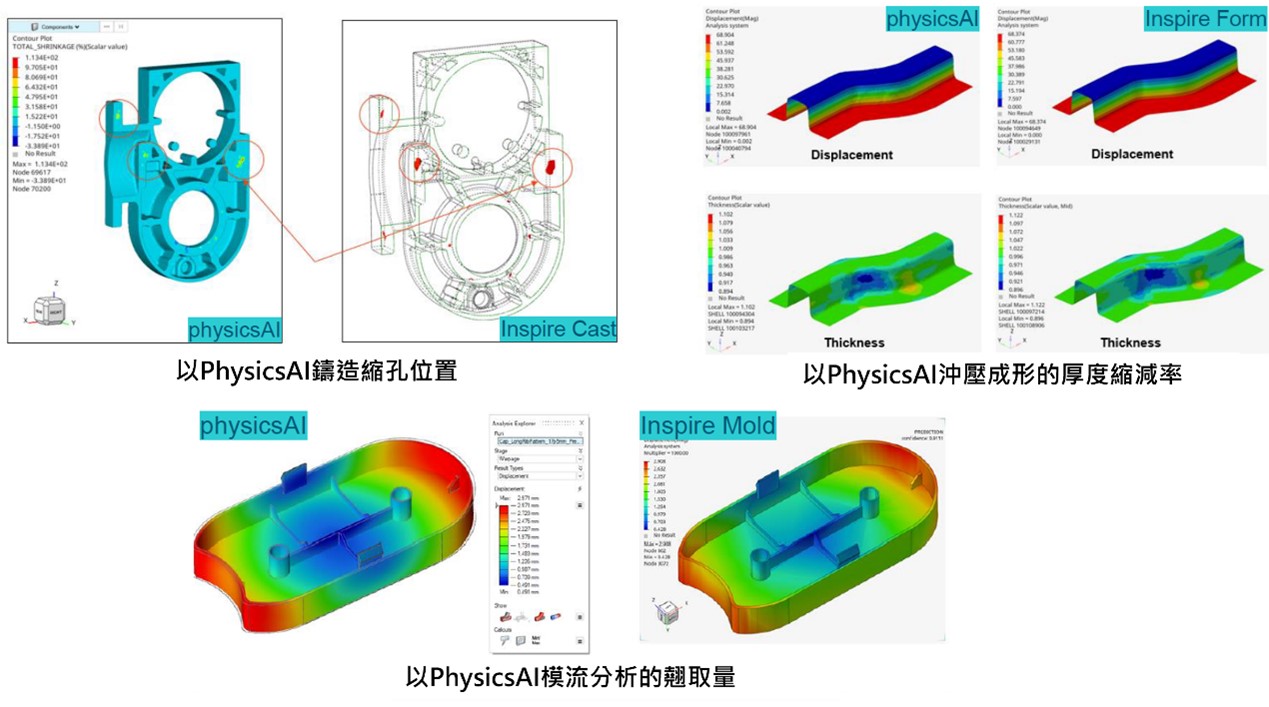
Figure 17. PhysicsAI application: manufacturing process result prediction
【 A brand-new Python-enabled API for custom development 】
- Enhanced HyperWorks Python API coverage: in the current version 2024.1, Python API coverage has been significantly improved, covering at least 98% of HyperWorks custom development capabilities.
- Python and HyperWorks are fully integrated: the Python 3.8.10 distribution included in the HyperMesh installation directory contains hundreds of popular packages and libraries such as Pandas, NumPy, SciPy, TensorFlow, openpyxl, Matplotlib, and more.
- Learning resources and help for the HyperWorks Python API: for related technical support information, refer to the Altair Python API Reference Guide, the Altair community forum, or contact Richin Technology.
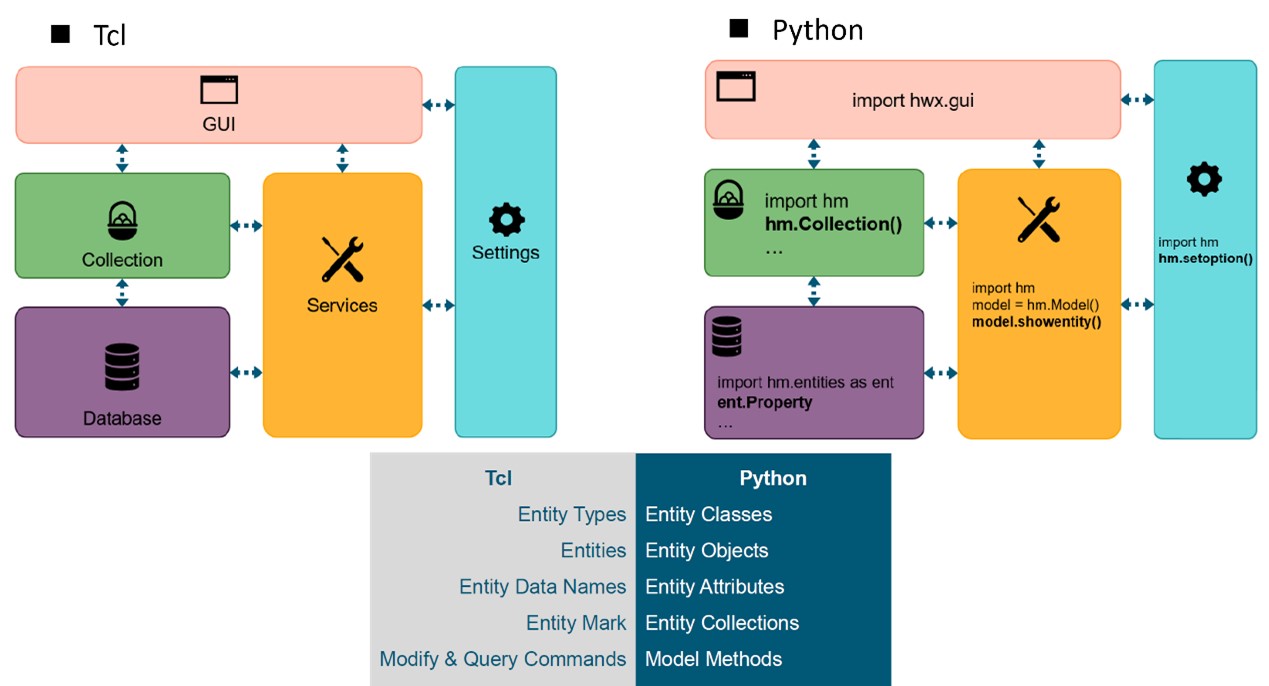
Figure 18. Architecture comparison between HyperWorks Python API and Tcl API
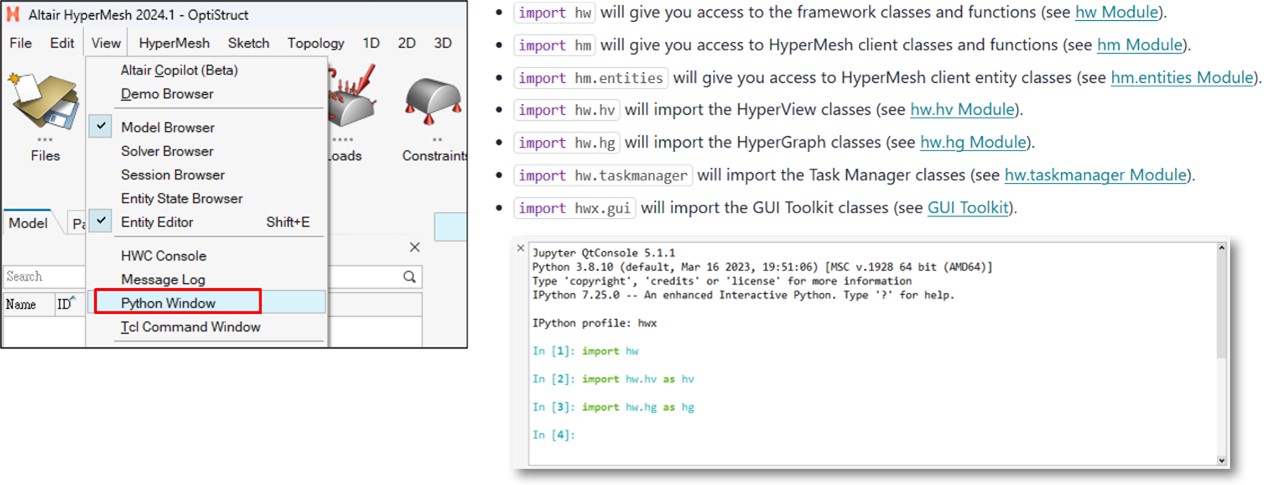
Figure 19. Python is fully integrated with HyperWorks and includes many popular libraries
【 Conclusion 】
- HyperMesh 2024.1 continues to enhance FE-Geometry capabilities, enabling more geometry editing functions that previously supported only CAD to be applied to FE-Geometry as well.
- SimLab 2024.1 further improves setup support for electromagnetic analysis, including automatic modeling templates for specific motor types, and significantly expands modeling capabilities for PCB and semiconductor 3D IC. The goal is to support various analysis needs across HyperWorks within a single pre/post-processing environment, lowering the learning curve for users.
- On the solver side, we can clearly see significant enhancements in OptiStruct. In the current version, it can already solve most engineering problems and even enables implicit/explicit continuation analysis. Altair plans to develop it into a primary finite element solver, so most users only need to learn one solver to address most problems.
- PhysicsAI expands support for more training parameters, including thickness, materials, and boundary conditions, providing more complete AI modeling and prediction capabilities.
- HyperWorks Python API has gradually matured and now supports most custom development tasks, but it still cannot directly record scripts; users need to build scripts with the help of learning resources.
Richin Technology is “an expert in CAE and AI data analytics,” and we have completed many successful case studies。
▶ Contact us now Contact Us to get more information。
▶ Subscribe Richin YouTube Channel to explore more CAE and data analytics。



