Introduction
Author: Richin Technology Chris
HyperWorks’ structural analysis solver OptiStruct has achieved major functional breakthroughs in recent years, enabling it to handle most structural analyses.
In terms of capabilities, it has already become a front-line structural solver. In 2025, OptiStruct continues to advance, adding even more explicit-analysis-related features. Next, we will walk you through the new technical highlights in OptiStruct 2025~2025.1.
▶️ Click here to watch the YouTube video introduction
【 OptiStruct 2025~2025.1 Technical Highlights 】
Implicit and Explicit Solving
“Implicit and Explicit Solving” sequential analysis.
|
Fully Coupled Electro-Thermo-Structural
“Fully Coupled Electro-Thermo-Structural” nonlinear analysis.
|
Temperature-Dependent Bonded Analysis
Bonded analysis now supports temperature-dependent adhesive properties (stiffness and strength).
|
Temperature-Dependent Material Plasticity
Supports input of temperature-dependent material plastic behavior (stress-strain curves).
|
Explicit Material Damage
Explicit analysis supports “material damage” calculations.
|
Second-Order Shell Element Large-Deformation Analysis
Second-order shell elements can support large-deformation nonlinear analysis.
|
Sensors Support Implicit
The Sensor function now supports Implicit analysis, enabling monitoring of specific physical quantities to decide whether the solver should stop.
|
FASTCONT Fast Contact Algorithm
Enhancements to the FASTCONT fast contact algorithm.
|
Enhanced Connector Element Capabilities
Further enhancements to connector element functionality.
|
Anisotropic Thermal Expansion Coefficients
Supports anisotropic coefficients of thermal expansion.
|
Strain-Rate Dependent Plasticity (Shell)
For shell elements, supports strain-rate-dependent material plasticity behavior (currently Implicit only).
|
LGDISP Supports Inertia Relief
Large deformation (LGDISP) subcases now support inertia relief.
|
Viscoelastic Shell Materials (Explicit)
Adds viscoelastic material settings for shell elements in Explicit.
|
More Materials (Foam, etc.)
Supports more material types in Explicit, especially foam materials.
|
PCOMPLS Thickness/Stacking Direction
Supports STACKD, DIR, or CORDM options in PCOMPLS to specify thickness/stacking direction using element or material coordinate systems.
|
Plasticity Settings Independent of MAT1
Introduces plasticity settings independent of MAT1, enabling plasticity data for special scenarios.
|
PCOMP/MATS1 Composite Plasticity
You can now define plastic behavior for composite laminates via PCOMP and MATS1.
|
Implicit Auto Contact
Implicit analysis now also supports auto contact.
|
Submodeling Supports Random Vibration
The submodeling feature supports random vibration analysis.
|
PCONT SELECT: Friction Can Vary by Subcase
Adds a SELECT card in PCONT to support subcase-dependent friction settings.
|
MAT1 SELECT: Material Coefficients/Plasticity Can Vary by Subcase
Adds a SELECT card in MAT1 to support subcase-dependent material coefficients and post-yield plasticity data.
|
Real-Time Recording of Composite Outputs
Composite laminate outputs (CSTRESS, CSTRAIN, and CFAILURE) can now be recorded while running and stored in the H3D file, so results can be viewed without waiting for completion.
|
Piezoelectric Material Optimization Support
Topology, shape, and size optimization analyses support piezoelectric materials.
|
|
【 Real-World Engineering Applications of New Highlight Features 】
The new features not only strengthen the software’s capabilities, but also play a key role in real engineering applications—making it possible to simulate physical phenomena that were previously considered difficult to model.
Below are some application directions we consider especially valuable:
Drop Test Analysis for Electronic Products
Before performing drop-test analysis for many electronic products, it is often necessary to run bolt pretension or snap-fit interference analysis first to obtain the assembled/fastened state. Only then can drop-test results under that state be accurate—this relies on “implicit and explicit solving” sequential analysis as shown in Figure 1.
Drop or impact analyses for electronic products may include packaging materials. To verify the cushioning effect of packaging, the new features support foam material models used in Explicit analysis, as shown in Figure 2.
If certain critical components require direct consideration of structural failure caused by material failure, the new version now supports material damage and failure under Explicit, as shown in Figure 3.
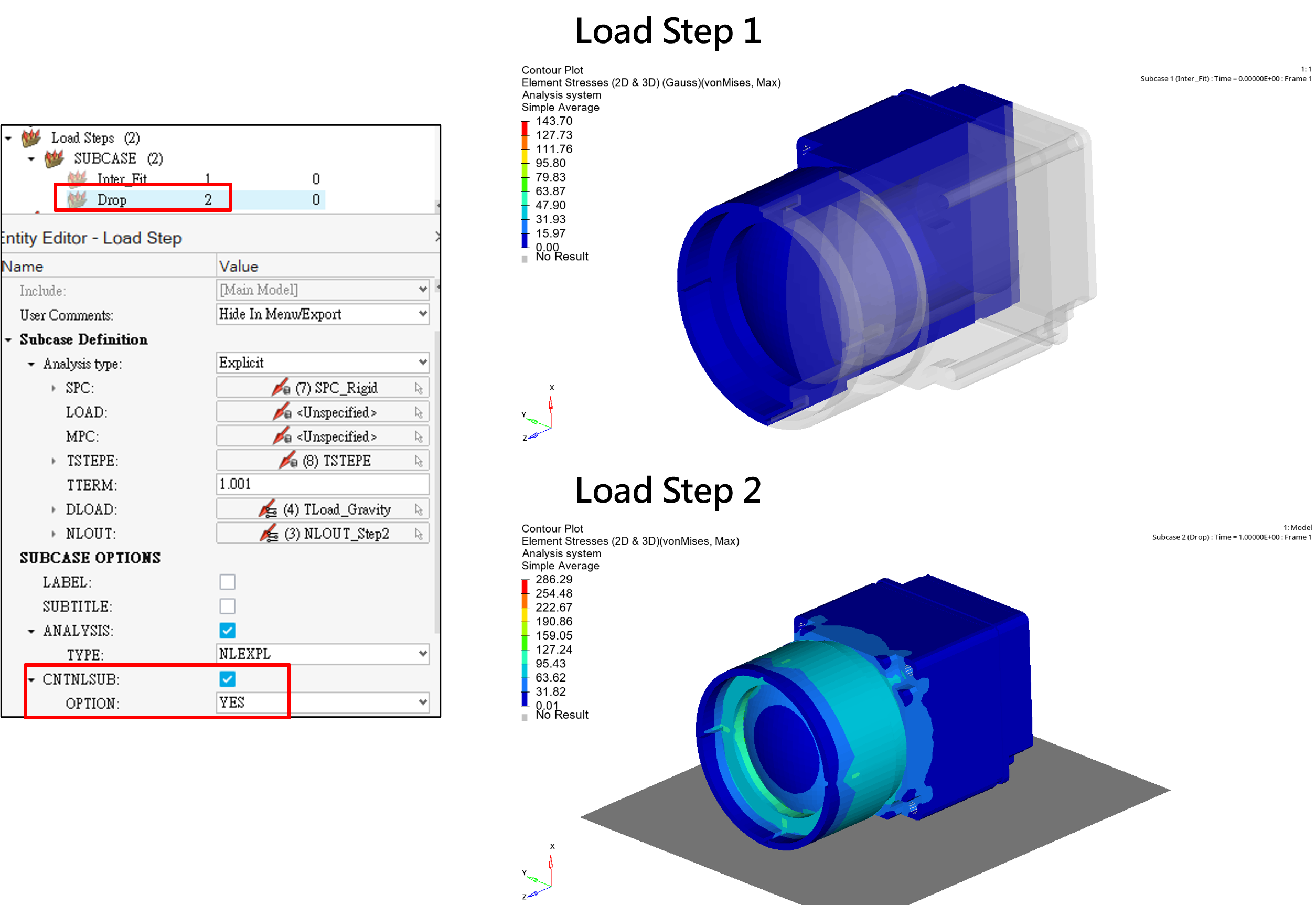
Figure 1. Sequential analysis using implicit and explicit solving
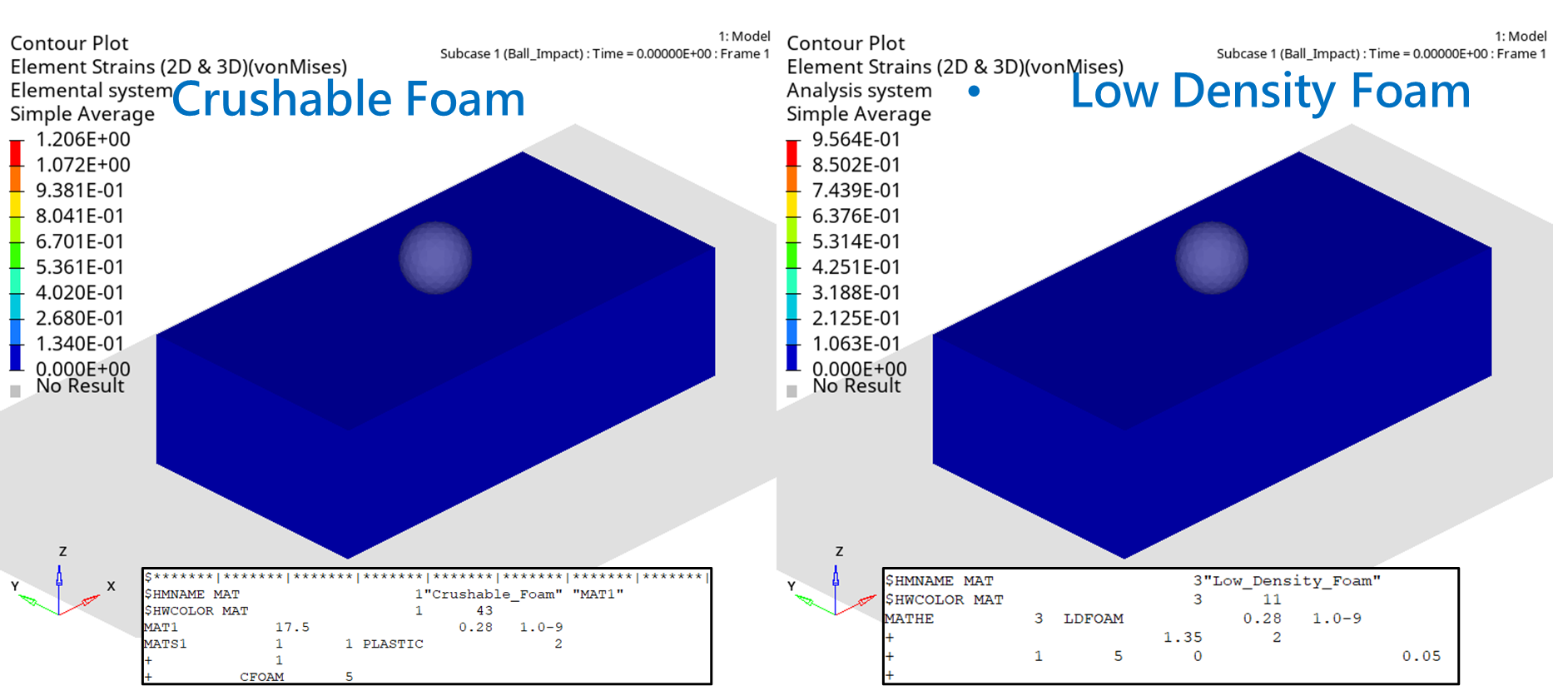
Figure 2. New Explicit foam material model
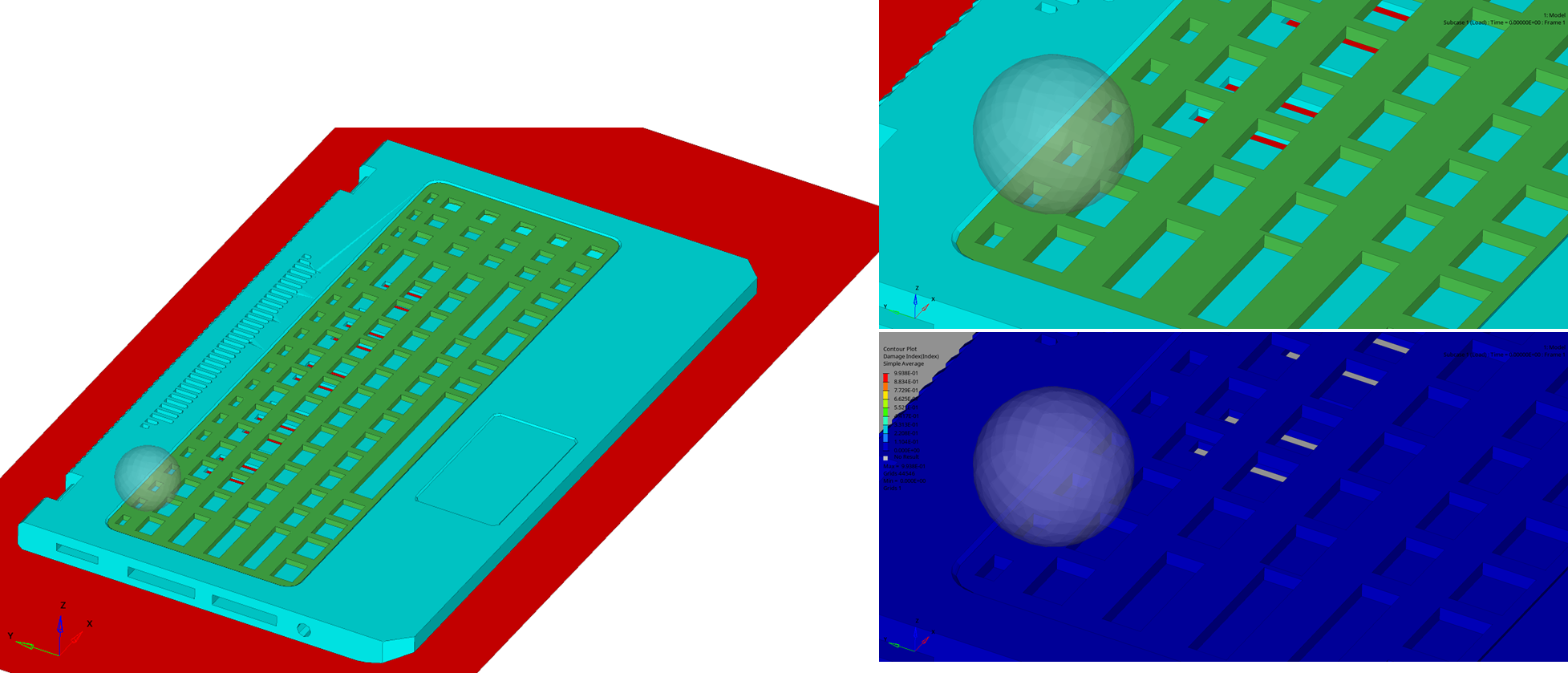
Figure 3. Material damage and failure under Explicit
Connector Terminal Insertion/Extraction Analysis
● Terminal insertion/extraction analysis is typically performed under “room temperature” conditions to obtain insertion force and retention force data. However, if you consider temperature rise due to current flow after insertion, you must be able to simulate how material behavior changes with temperature increase.
With the new features, you can input temperature-dependent material plastic behavior (stress-strain curves) as shown in Figure 4, perfectly meeting this type of simulation requirement.
● If, during current flow, you need to consider temperature rise due to Joule heating—and further account for “structural thermal expansion” and “thermal stress” behavior after heating—then you need to perform fully coupled electro-thermo-structural analysis in one go. This outstanding capability has also been added in the latest version: the fully coupled electro-thermo-structural nonlinear analysis shown in Figure 5. It not only accounts for multiphysics coupling, but can also compute nonlinear behavior in all three physics domains.
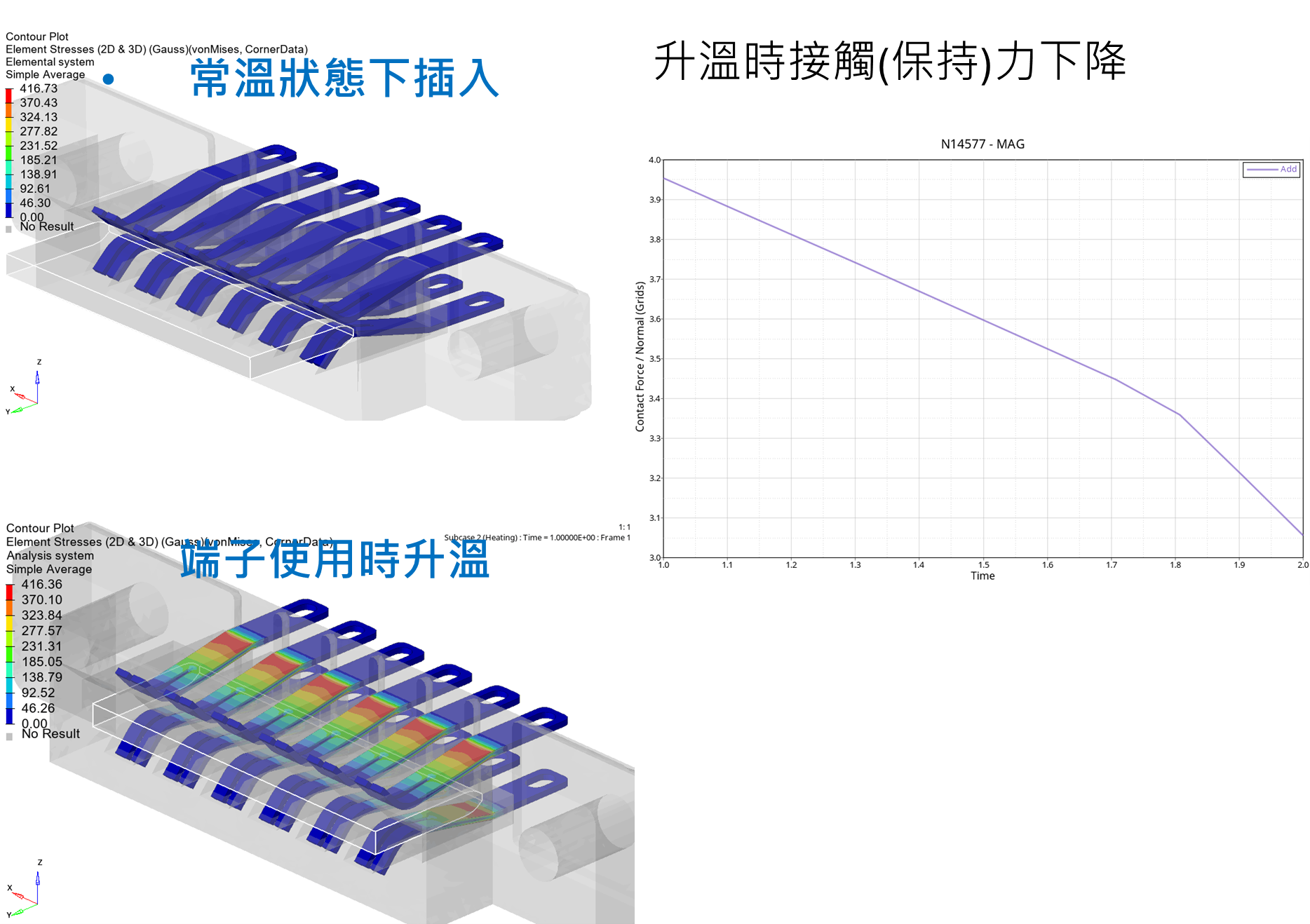
Figure 4. Supports input of temperature-dependent material plastic behavior (stress-strain curves)
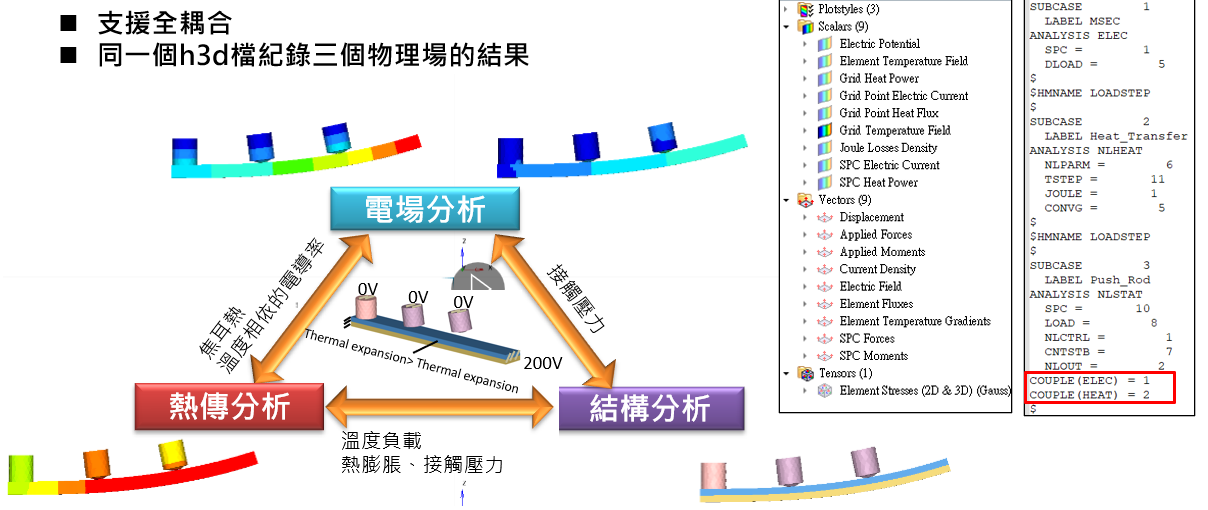
Figure 5. Fully coupled electro-thermo-structural nonlinear analysis
Strength Verification for “Lens Module Lens Bonding”
● Lenses in lens modules are often bonded to other lenses or external structures using adhesives. In general, lens modules must be evaluated under use conditions across “different temperature environments,” so bonding strength may also need to account for the effect of temperature. One of the new features in this release is temperature dependence support in bonded analysis, as shown in Figure 6—meaning OptiStruct is now capable of simulating this type of physical problem.
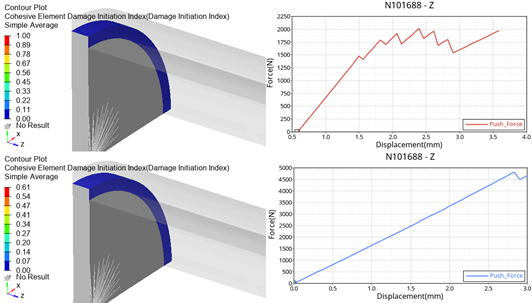
Figure 6. Bonded analysis supports temperature dependence
“Thermal Expansion” and “Thermal Stress Analysis” of Composite Materials
● One of the new features in this release is the ability to consider anisotropic coefficients of thermal expansion, as shown in Figure 7. In engineering practice, the most common anisotropic materials are composite materials—so thermal analysis capability for composites is significantly improved.
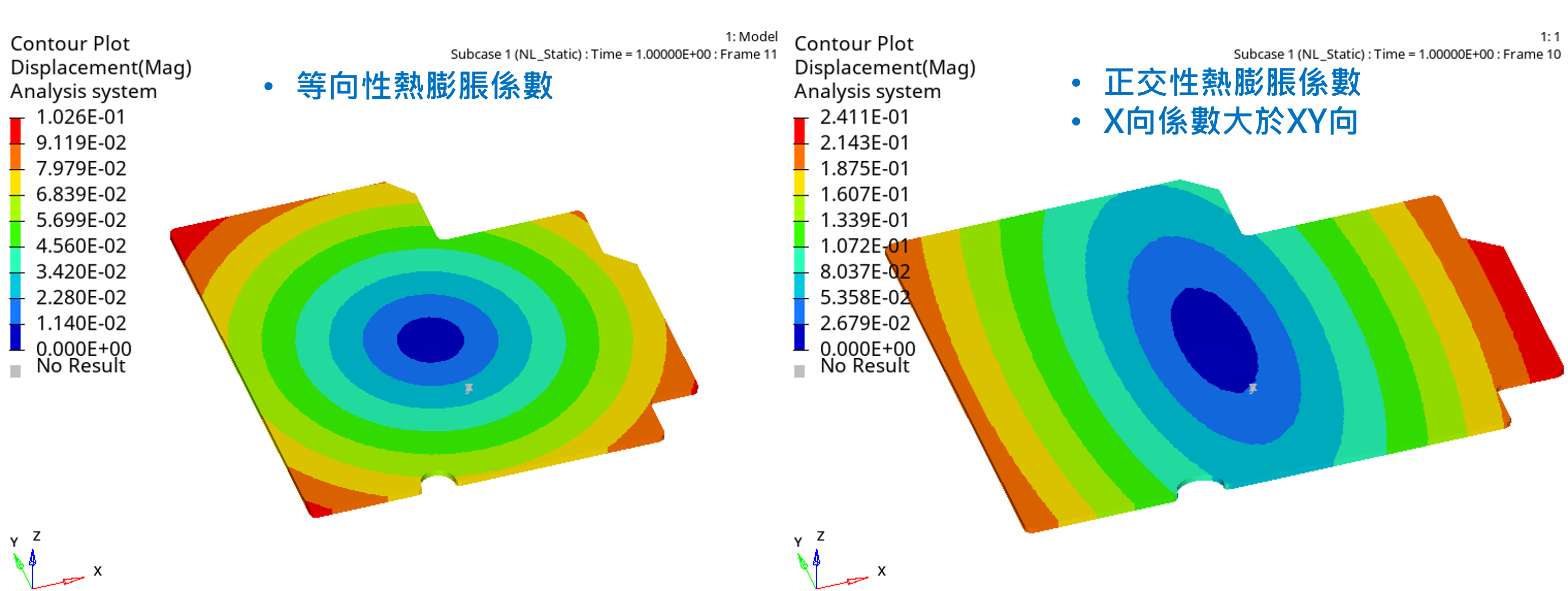
Figure 7. Supports anisotropic coefficients of thermal expansion
Nonlinear Structural Buckling Analysis
● To determine the maximum load a structure can withstand, a nonlinear analysis is typically performed by continuously compressing a specific location to identify the peak post-buckling reaction force.
For example: “Three-point bending analysis for a mobile phone.”
A key challenge with this type of problem is not knowing how much “prescribed displacement load” to apply. Too little → you may miss the peak reaction force; too much → you may greatly increase analysis time, reducing efficiency and wasting computational resources.
In this release, the Sensor feature now supports Implicit calculations, as shown in Figure 8. Its purpose is to monitor changes in “specific physical quantities” to determine whether the analysis should be terminated.
● When the reaction-force limit is uncertain, you can confidently set a “larger” prescribed displacement and use this feature to automatically truncate solve time. For example, monitor whether the punch reaction force has passed its peak; once past the peak, the solver stops automatically—avoiding excessively long runs.
● After “nonlinear buckling,” self-contact may occur. If this is not anticipated when defining contact pairs, the simulated physical behavior can be completely incorrect.
Now, auto contact also supports Implicit analysis (Figure 9). You can use auto contact to address this issue and avoid setup mistakes.
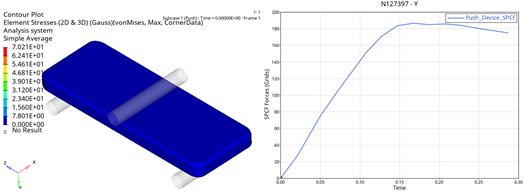
Figure 8. Sensor settings support Implicit analysis
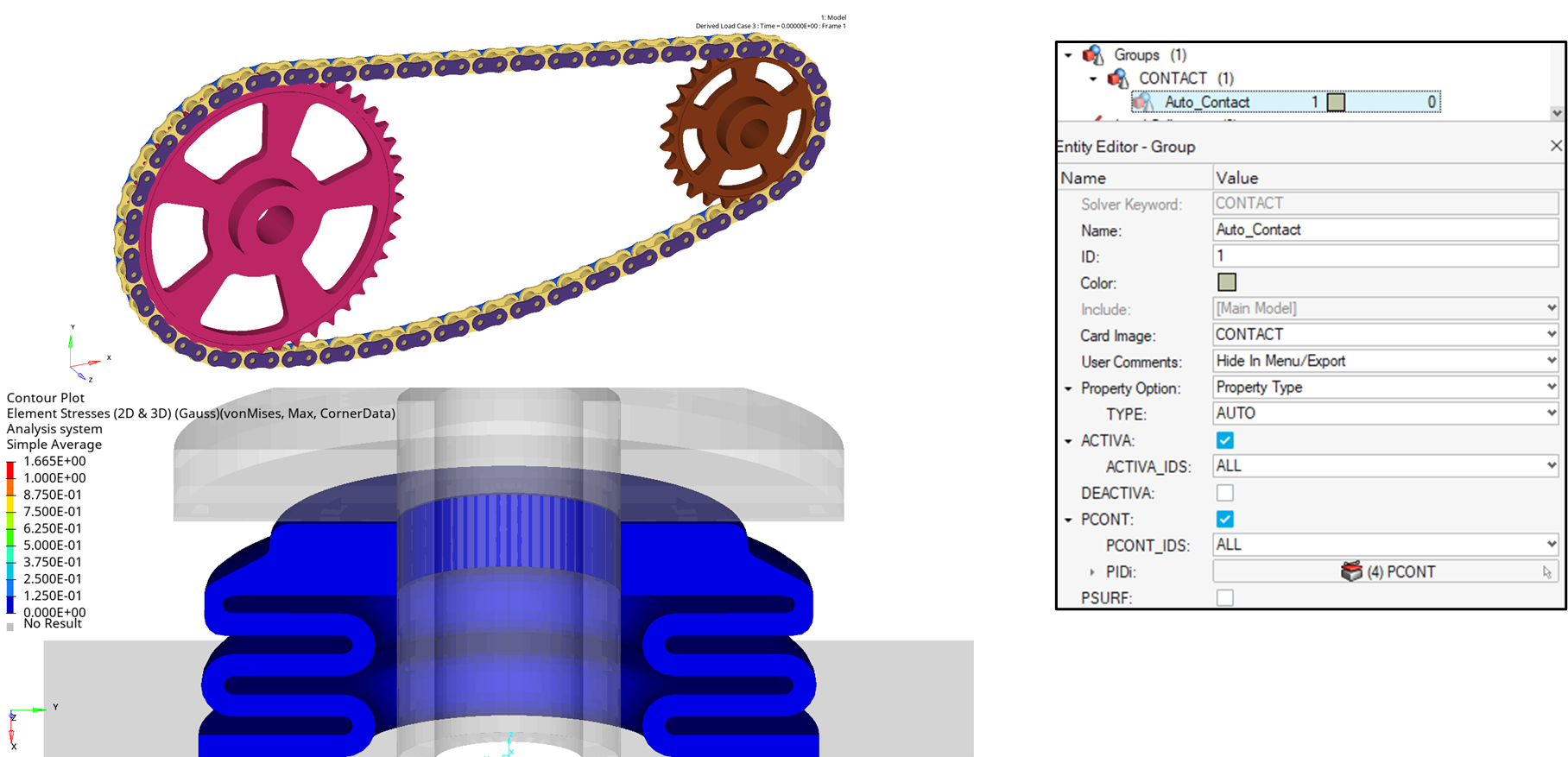
Figure 9. Auto contact supports Implicit analysis
Special Load Analyses for Aerospace/Aviation Vehicles
● When performing flight-load analysis for aircraft, it is generally “not possible” to apply prescribed displacement constraints. Most analyses rely on “inertia relief.” However, inertia relief previously could not consider geometric nonlinearity, making some special problems unsolvable—for example: “locally applied high-pressure load with anisotropic material,” where linear analysis yields unreasonable results.
In this release, the large-deformation analysis step now supports inertia relief, as shown in Figure 10, perfectly resolving this limitation.
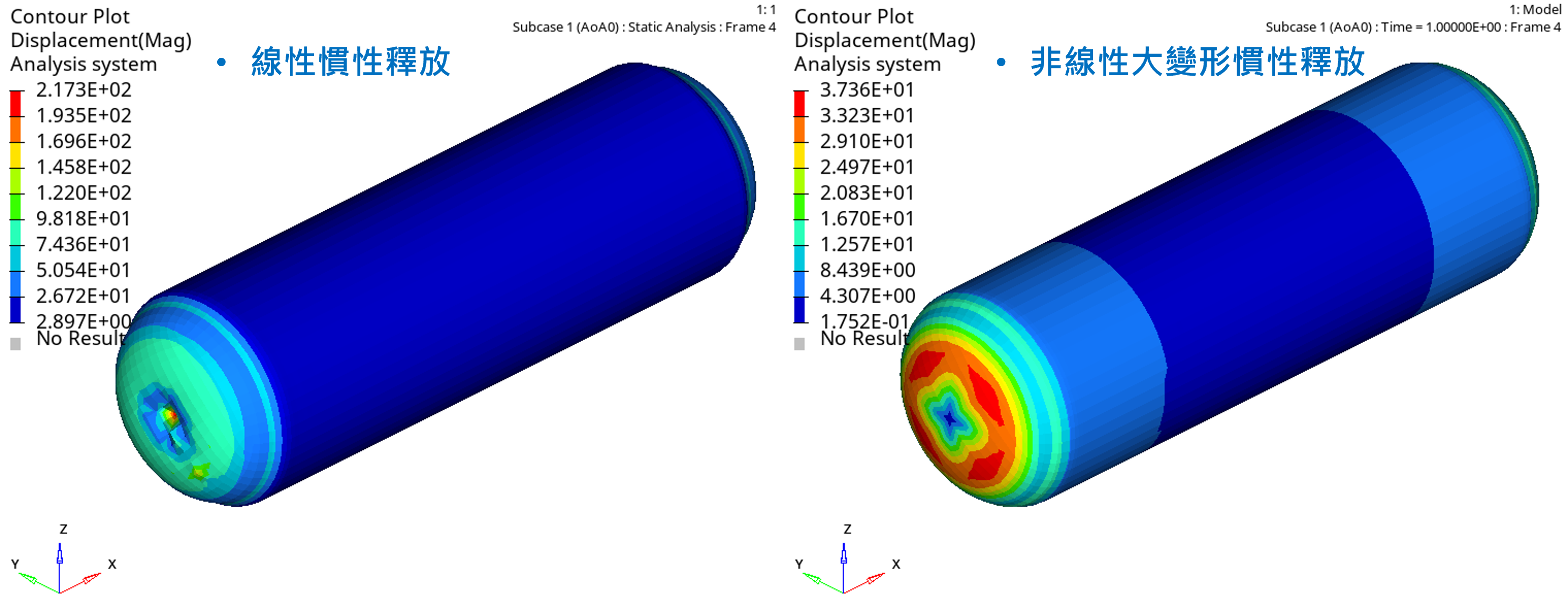
Figure 10. Large-deformation analysis step supports inertia relief
Nonlinear Analysis Under Changing Environmental Conditions
● Although OptiStruct now supports multiphysics simulation and even coupling between physics domains, some special environmental variables still cannot be modeled directly—for example: lubrication introduced after a spring clip is inserted (making extraction smoother), or increased deformation and reduced strength due to rising humidity after loading.
● However, we can now simulate such environmental changes using subcase-dependent friction coefficients and material coefficient settings, as shown in Figure 11 and Figure 12.
● OptiStruct provides a mechanism for users to control related parameters by “subcase” directly—without needing to determine whether lubrication or humidity caused the change, but instead “directly observing” the impact of the parameter variation.
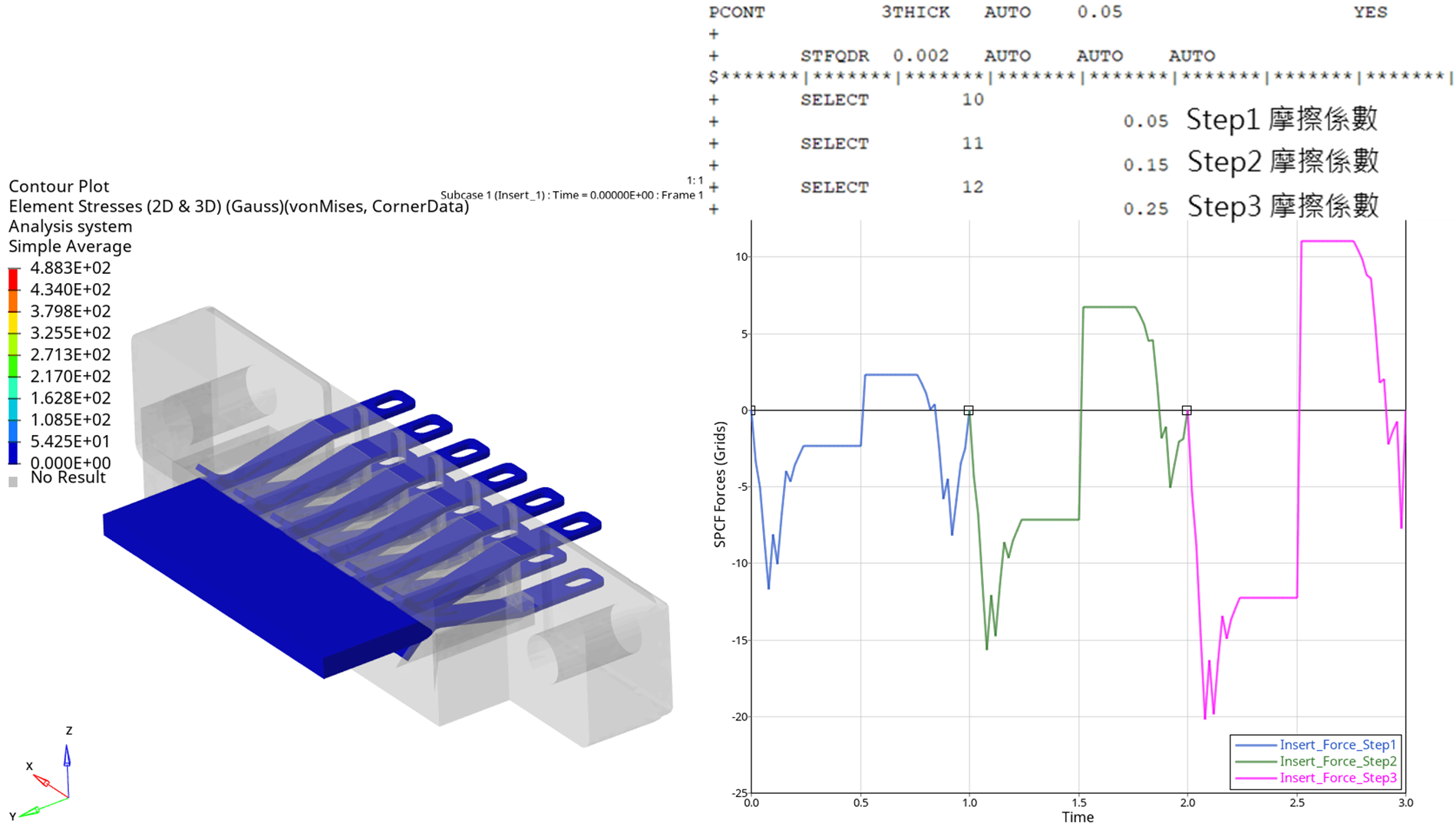
Figure 11. Subcase-dependent friction coefficient settings
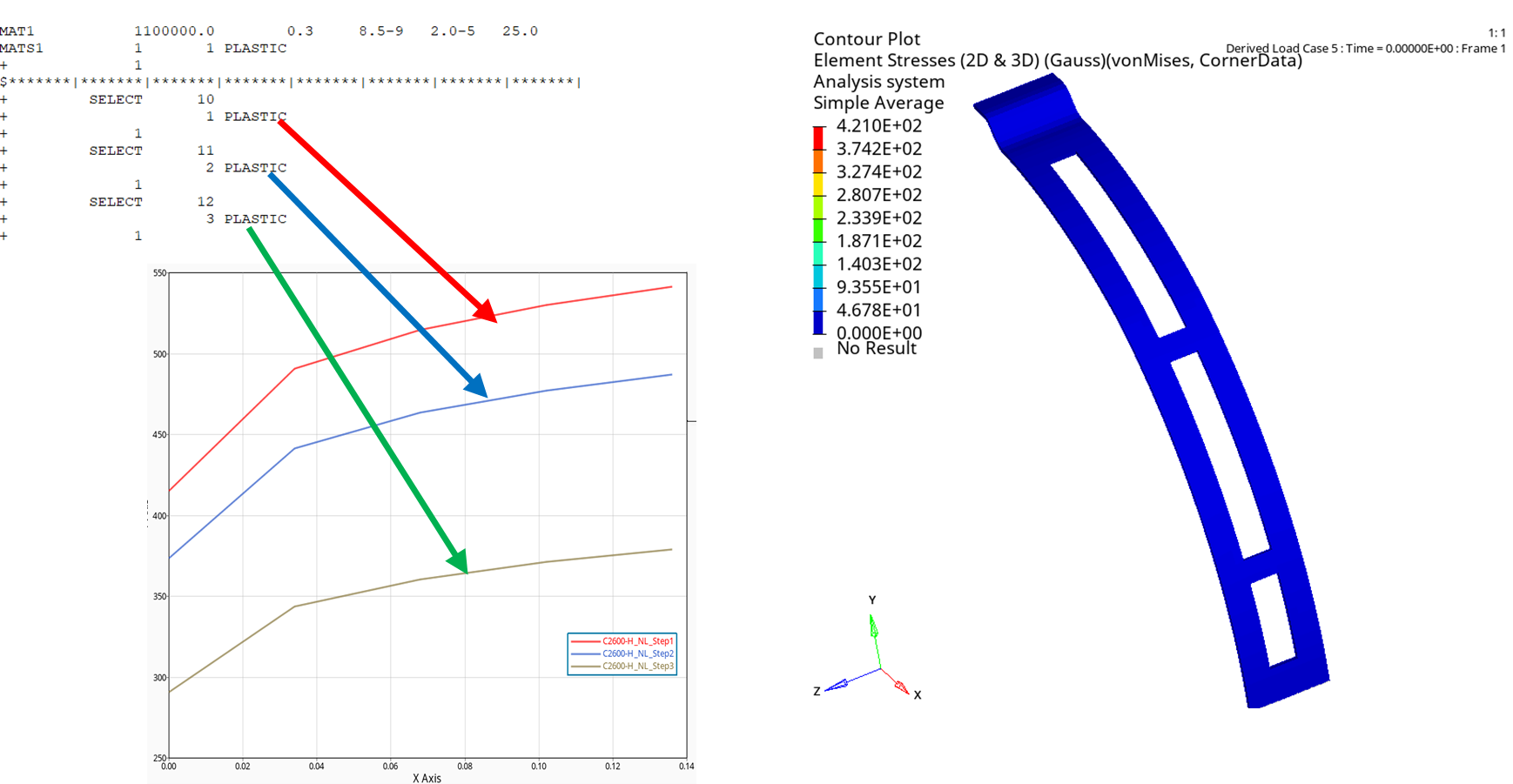
Figure 12. Subcase-dependent material coefficient settings
Optimal Design of Piezoelectric Materials
● It is now possible to perform “topology, shape, and size” optimization analyses for structures using piezoelectric materials.
| Shape and size optimization |
Can only be performed in non-piezoelectric regions of the structure |
| Topology optimization |
Can be computed directly on piezoelectric material structures, as shown in Figure 13 |
● With this capability, you can balance energy-conversion performance (electrical to mechanical) with structural stiffness and strength, producing a theoretical optimal shape for R&D reference—potentially inspiring new design ideas and directions.
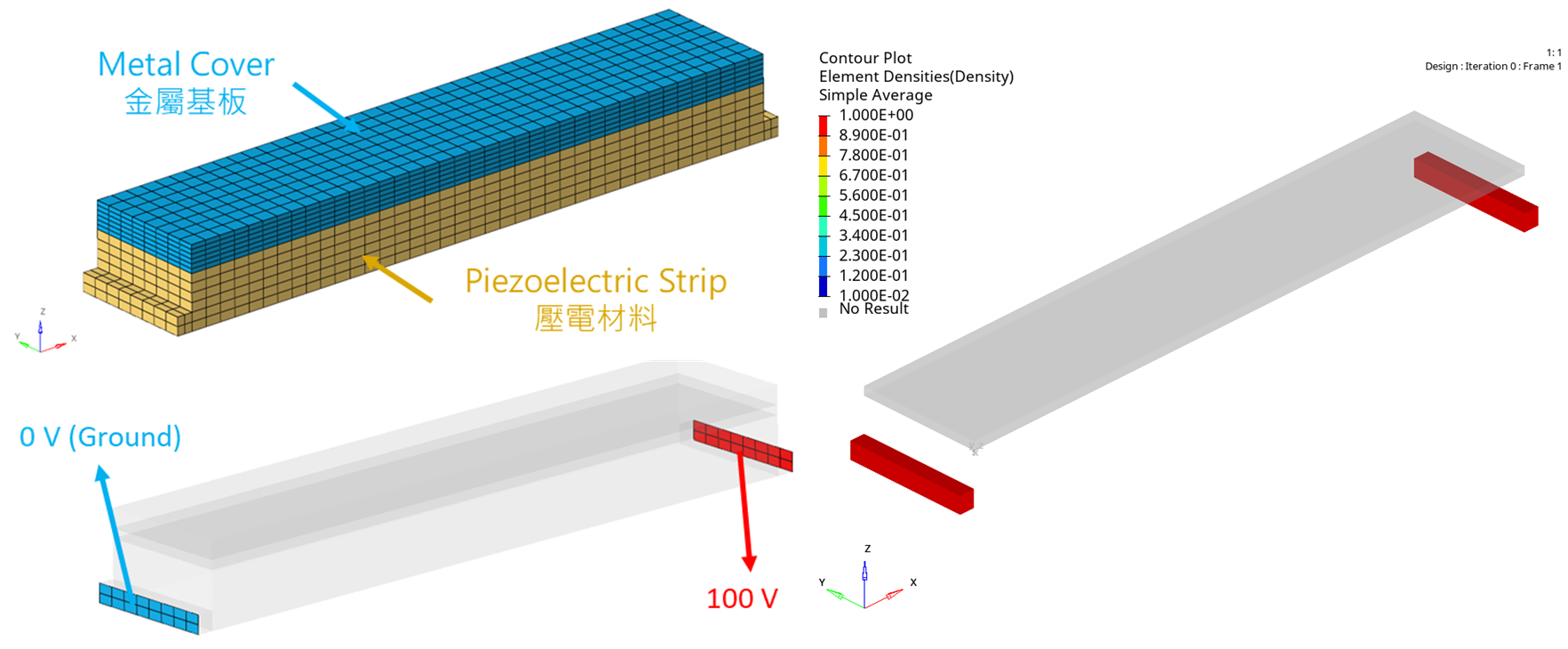
Figure 13. Topology optimization analysis supports piezoelectric materials
【 Conclusion 】
- In versions after 2025, OptiStruct has been significantly enhanced, and the current version can already solve most engineering problems.
- In the latest release, many practical functions have been added—such as Sensor support for Implicit, inertia relief support for large-deformation analysis, auto contact support for Implicit, and PCOMP support for plastic behavior—further improving the flexibility and convenience of OptiStruct.
- The implicit-explicit sequential analysis capability is now quite complete. For Explicit solving, the software also adds packaging-type material models and material failure considerations—so for most users who need Explicit solving, you can prioritize using OptiStruct directly, saving time and effort otherwise spent switching solvers.
- In addition to the practical new functions above, advanced solving capabilities have also been added—such as changing contact friction coefficients or material properties by subcase, and topology optimization support for piezoelectric materials—further expanding the application scope of OptiStruct.
- We have already completed preliminary research on the above techniques. If you have related needs, please feel free to contact us.
Richin Technology is “an expert in CAE and AI data analytics,” and we have completed many successful case studies.
▶ Contact us now Contact Us to get more information.
▶ Subscribe Richin YouTube Channel to explore more CAE and data analytics.



