External Aerodynamics
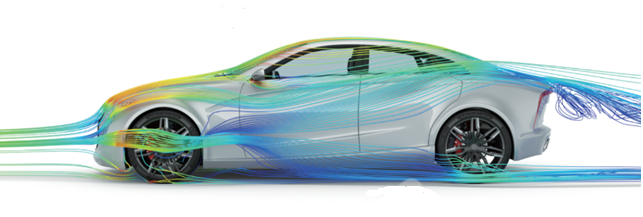
Altair Virtual Wind Tunnel is a vertical application software dedicated to external aerodynamics. Its graphical user interface is developed and designed based on user requirements, making problem definition and solver setup much more convenient. After each computation, the automatic generation of customized reports ensures consistency in design evaluation. Altair Virtual Wind Tunnel can be seamlessly integrated with other Altair products within the Altair Simulation platform.
【 Product Highlights 】
- Dedicated to external aerodynamics studies
- Accurate, robust, and scalable CFD solver
- Highly streamlined simulation workflow
- Automated generation of customized reports
About Virtual Wind Tunnel (Virtual Wind Tunnel)
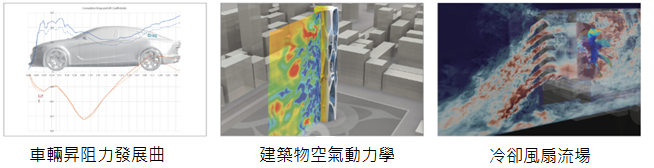
Virtual Wind Tunnel (VWT) is a new vertical application technology designed to provide a more efficient wind tunnel simulation environment and user experience. Thanks to its highly automated and streamlined simulation process, together with the LBM-based solver Altair ultraFluidX, VWT can perform high-accuracy transient simulations of flow around objects. In addition to predicting aerodynamic performance such as drag and lift for the automotive industry, VWT can also be applied to aerodynamics studies of buildings, bicycles, and motorcycles.
VWT integrates several state-of-the-art technologies from the Altair Simulation platform, such as concept design tools, meshless fluid solvers, powerful CFD post-processing capabilities, and an intuitive user interface.
Accurate, robust, and scalable CFD solver
The core technology of VWT is Altair’s advanced CFD solver—ultraFluidX—which provides unique advantages in terms of speed, accuracy, and robustness.
ultraFluidX is based on the lattice Boltzmann (LBM) method. Compared with traditional FVM/FEM approaches, it features lower numerical dissipation and a much simpler preprocessing workflow.
Thanks to GPU hardware acceleration, models with hundreds of millions of lattice cells for full-vehicle virtual wind tunnel simulations can be computed overnight on a single GPU server.
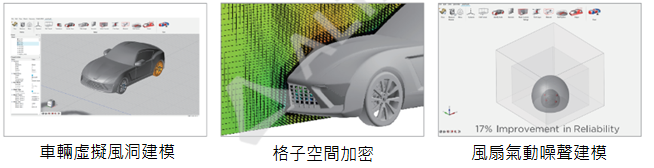
Using the RANS method for steady-state analysis and the DES method for transient simulations, VWT can deliver accurate external flow field results. The flow–structure interaction (FSI) capabilities of AcuSolve are also integrated into VWT to support the analysis of flexible components in external flows, such as aerodynamic spoilers.
Rotating bodies (such as wheels) are modeled by specifying a tangential wall velocity, so rotational effects are taken into account during simulation. In automotive applications, heat exchangers and condensers are modeled as porous media to capture their pressure drop characteristics. Fluid materials used in simulations can be defined by density and viscosity, or by directly modeling water and air at a given temperature.
Sketching and geometry creation tools
Users can create and edit geometric features from sketches, such as points, lines, surfaces, polygons, ellipses, circles, arcs, splines, and more. Solid geometry can be created and edited using tools like extrude, mirror, pattern, patch, Boolean operations, and cutting, enabling rapid model creation and simplification.
PolyNURBS tools
The PolyNURBS tools allow users to quickly create smooth and continuous free-form solid geometry. This capability is often used in aerodynamics for modeling advanced surfaces and defining regions for localized LBM lattice refinement.
Wind tunnel parameter setup
Within VWT, users can define parameters consistent with a physical wind tunnel, such as tunnel dimensions, inflow velocity, boundary layer suction locations, moving ground system, front and rear suspension heights of the vehicle, porous media characteristics for heat exchangers, and air properties.
Users can interactively create monitoring planes and probe points, detect and locate model leaks, define artificial turbulence generators, perform feature recognition (heat exchangers, fans, wheels), and configure various lattice refinement strategies (FarField / Box / Offset / Custom).
Rotating body modeling
The aerodynamic performance of tires and wheels has become a key focus for many automotive OEMs. VWT provides three modeling approaches: Rotating Wall, MRF, and Overset Mesh, with increasing accuracy and computational cost in that order.
VWT can also simulate fan noise in free-field conditions. Users can define virtual microphone locations, and the fan rotation region is represented using Overset Mesh. The entire CAA acoustic model and aerodynamic model share the same setup, while noise signal processing is handled by other modules within HyperWorks.
Analysis reports
After each analysis, VWT automatically generates a PDF/PPT report using scripts. The report includes information on the computing hardware, aerodynamic coefficients, wind tunnel parameters, solver settings, and key results such as drag and lift history, component-wise drag contributions, pressure iso-surfaces, pressure coefficient contours, and 3D streamlines. Of course, users can also perform manual CFD post-processing of the results.
Highly automated workflow
The graphical user interface of VWT is very concise and incorporates many automated operations to reduce user effort and improve modeling efficiency. Users import the surface mesh of the object under aerodynamic study (such as a vehicle or building) into VWT, set up the physical models and local refinement controls, submit the job, and obtain a simulation report.
Because the LBM method accepts STL models with penetrations, overlaps, and non-conformal nodes, component replacement becomes much more convenient. All VWT settings can be saved as XML templates, and reusing these templates helps ensure consistent simulation conditions and post-processing.
Richin Tech is the "expert in CAE and AI data analytics", and we have completed many successful case studies.
▶ Contact us now to get more information.
▶ Subscribe to the Richin YouTube channel to explore more about CAE and data analytics.



